

If You’re Tired of AI Buzzwords, You’re Not Alone
Let’s be honest. If you run a small sales team, you’ve probably rolled your eyes at least once this year reading about “revolutionary AI-powered CRM features.”
Every software vendor suddenly has “AI” in their pitch deck. But when you’re managing 5-15 salespeople and juggling a hundred other priorities, the question isn’t “is AI cool?” — it’s “will this actually help us close more deals?”
After watching dozens of small teams adopt (and sometimes abandon) AI-powered CRM tools, here’s what genuinely moves the needle in 2025.
The AI Features That Actually Work for Small Teams
Not all AI features are created equal. Some require months of data and a dedicated admin. Others start delivering value in week one. Here’s where to focus:
1. Lead Prioritization (The Real Game-Changer)
This is where AI earns its keep for small teams.
Instead of your reps guessing which leads to call first, AI analyzes patterns — response times, email engagement, website visits, demographic fit — and surfaces the leads most likely to convert.
Think of it like this: without AI, your sales rep is fishing in a pond with 200 fish, hoping they hook a hungry one. With AI lead scoring, they’re casting directly at the fish that are already circling the bait.
What to look for:
- Scoring that updates in real-time (not weekly batches)
- Clear explanations of why a lead ranks high
- Easy override when your rep knows something the AI doesn’t
What to avoid:
- Systems that require 10,000+ leads before they “learn”
- Black-box scoring with no transparency
For a team of 10 reps, even a 15% improvement in lead prioritization can mean 2-3 extra closed deals per month. That’s not hype — that’s math.
2. AI-Assisted Follow-Up (Your Reps’ New Best Friend)
Here’s a scenario every sales manager knows: A rep has a great call. They promise to send a follow-up email. Then three more calls happen, and that email becomes a vague memory.
AI-assisted follow-up changes this in two practical ways:
Automatic call summaries: Instead of typing notes during a call (or worse, forgetting), AI listens and generates a summary. Key points, action items, next steps — captured without your rep breaking focus.
Smart email drafting: Based on the call summary and lead context, AI drafts a follow-up email. Your rep reviews, tweaks the tone, and hits send. A 20-minute task becomes 3 minutes.
The important word here is “assisted.” The best AI tools in 2025 don’t replace your rep’s judgment — they handle the tedious parts so your rep can focus on the human parts. Building rapport. Handling objections. Closing.
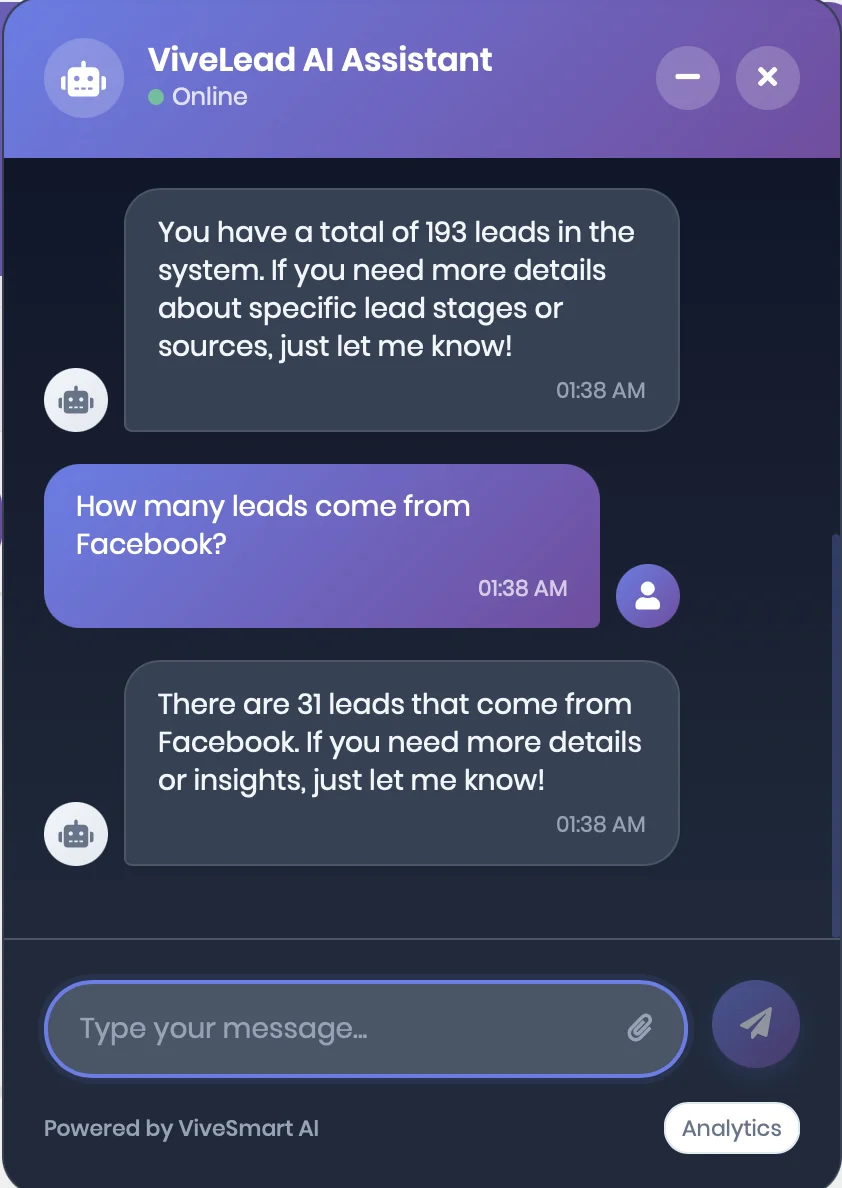
ViveLead’s AI Assistant: Ask questions in plain English, get instant answers about your leads and pipeline.
3. Pipeline Intelligence (See Problems Before They Become Problems)
A sales pipeline is only useful if it reflects reality. And let’s be honest — most small team pipelines are part fiction.
Deals sit in “negotiation” for weeks when they’re actually dead. Optimistic reps inflate probabilities. By the time you realize Q3 is in trouble, it’s mid-August.
AI-powered pipeline analysis fixes this by:
- Flagging stale deals: “This deal hasn’t had activity in 14 days — still active?”
- Adjusting close probabilities: Based on actual patterns, not rep optimism
- Predicting revenue more accurately: Using historical data, not gut feelings
For a small team, this isn’t about fancy dashboards. It’s about the sales manager sleeping better because they actually know what’s coming next month.
What Doesn’t Work (Yet) for Small Teams
Let’s save you some money and frustration. These AI features sound impressive but often underdeliver for smaller operations:
“Predictive analytics” with insufficient data: AI needs patterns to learn from. If you close 20 deals a month, you don’t have enough data for sophisticated predictions. Don’t pay premium prices for features that need enterprise-scale volume.
Fully autonomous AI agents: The “AI that books meetings and handles objections on its own” demos are impressive. Real-world performance? Spotty. Customers can tell, and it can hurt your brand. Use AI to assist humans, not replace them.
Complex workflow automation: Yes, AI can trigger 47-step sequences based on behavioral signals. But if your team can barely keep the CRM updated, you’re not ready for that. Walk before you run.
How to Evaluate AI Features Without Getting Burned
Before you sign that contract, ask these questions:
“What’s the minimum data required?” If they say “it just works,” push harder. Good vendors are honest about ramp-up time.
“Can I see this working on a small account?” Enterprise case studies don’t prove it’ll work for you. Ask for references from teams your size.
“What happens when the AI is wrong?” How easy is it to correct? Does it learn from corrections? Can reps override without friction?
“What’s included vs. what costs extra?” AI features are often in higher pricing tiers. Make sure you’re comparing apples to apples.
The Bottom Line: Start Simple, Stay Practical
Here’s my honest take after years of watching small teams adopt CRM technology:
The best AI for your team in 2025 isn’t the most advanced. It’s the most usable.
Start with one high-impact feature — lead prioritization is usually the best entry point. Get your team comfortable with it. See real results. Then expand.
The companies winning with AI aren’t the ones with the fanciest tools. They’re the ones whose reps actually use the tools they have.
And that’s something no AI can do for you.
Quick Checklist: AI CRM Features Worth Paying For
| Worth It | Skip It |
|---|---|
| Real-time lead scoring with explainable rankings | Complex features requiring dedicated admin |
| Automatic call summaries and notes | “Autonomous” AI that customers can detect |
| AI-drafted follow-up emails (human-reviewed) | Analytics needing 6+ months of data to work |
| Pipeline health alerts and stale deal flagging | - |
| Revenue forecasting based on actual patterns | - |
Frequently Asked Questions
What is an AI-powered sales pipeline?
An AI-powered sales pipeline uses machine learning to analyze deal activity, predict close probabilities, and flag at-risk opportunities. Unlike traditional pipelines that rely on manual updates, AI continuously adjusts based on real engagement patterns.
How does AI help prioritize leads in a CRM?
AI analyzes multiple signals — email opens, website visits, response times, firmographic data — and assigns scores to leads based on conversion likelihood. This helps sales reps focus on prospects most likely to buy instead of working leads randomly.
Is AI in CRM worth it for small businesses?
Yes, if you choose the right features. Lead prioritization and follow-up automation deliver ROI quickly for small teams. Avoid complex AI features designed for enterprise-scale data volumes.
What’s the difference between AI-assisted and AI-automated CRM features?
AI-assisted features help humans work faster (drafting emails, summarizing calls). AI-automated features act independently (sending messages, booking meetings). For most small teams in 2025, AI-assisted delivers better results with fewer risks.
How much data does AI in CRM need to work effectively?
It depends on the feature. Basic lead scoring can work with a few hundred leads. Advanced predictive analytics typically needs thousands of data points and several months of history to generate reliable insights.
Looking for a CRM with practical AI features built for small teams? See how Vivelead’s AI assistant works →