Automate Google Sheets to WhatsApp: Why the Sheet Fails
Automate Google Sheets to WhatsApp 3 real ways (Apps Script, Pabbly/Make, BSP), why each breaks, and the durable CRM fix on Rs 999.

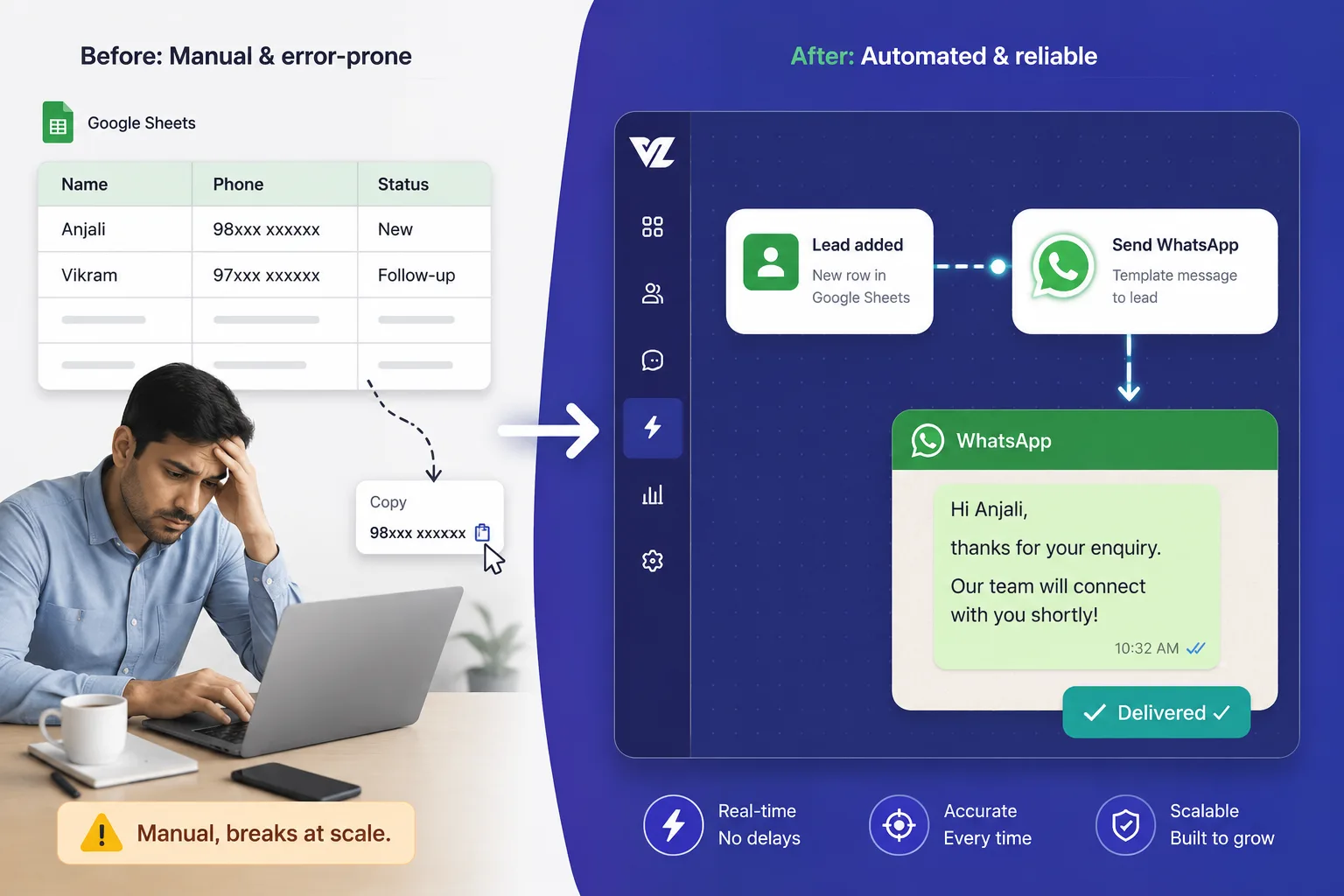
The 11pm Scene You Already Know
It is 11pm. An admissions counsellor has a Google Sheet open on one screen and WhatsApp Web on the other. She copies a number from row 1, pastes it into WhatsApp, types “Hi Rahul, thanks for your interest in our IIT-JEE batch, can we schedule a demo class this week?”, hits send, then colours the row yellow so she knows it is done. Row 2. Copy, paste, type, send, yellow. Row 3. By row 40 she has lost the thread, two rows are coloured wrong, and a parent who filled the form on Friday night and was ready to pay is still sitting uncoloured because nobody got to him before the weekend ended.
This is the problem you are actually trying to solve when you search “automate Google Sheets to WhatsApp.” You want the copy-paste grind to stop, and you want to stop losing leads in the gaps. Fair.
So here is the honest version, the one nobody who is selling you a connector will give you straight. I will show you the three real ways to automate Sheets to WhatsApp, free Apps Script, no-code middleware, and a BSP, exactly why each one breaks, and the durable answer for when the breaking stops mattering. And the one blunt line this whole blog rests on: the Sheet is not your CRM. It is the proof you do not have one.
The 3 Real Ways to Automate Google Sheets to WhatsApp (At a Glance)
Here is the whole landscape in one table. Costs are researched 2026 ranges, verify on each vendor’s current pricing page.
| Method | Up-front cost | What it actually is | Where it breaks first |
|---|---|---|---|
| 1. Apps Script + official Meta Cloud API | Rs 0 software | A free script you maintain yourself | Token expires every ~23h, 6-minute run cap, no delivery log |
| 2. Apps Script + unofficial WhatsApp gateway | Rs 0 to low | A sender extension that blasts free text | Against WhatsApp Terms, real risk of a number ban |
| 3. No-code middleware (Pabbly/Zapier/Make) + a BSP | Rs 1,300 to 8,000+/mo combined | Glue between the Sheet and a WhatsApp tool | Per-task metering, two bills, and the Sheet is still the database |
All three of these work. You can genuinely send messages with any of them. But look at what they share: in every single case, the Google Sheet stays the source of truth. The lead’s stage, owner, last note, and next follow-up all still live in spreadsheet cells that nobody locks. So nobody actually owns the lead record. We will come back to why that is the disease and not a detail. First, the three routes, properly.
Quick answer for people who just want the snippet
You can automate Google Sheets to WhatsApp with a free Google Apps Script calling the official Meta Cloud API, a no-code tool like Pabbly Connect or Make wired to a WhatsApp BSP, or a BSP’s own Google Sheets feature. All three work for sending. All three keep your leads living in a spreadsheet, which is the deeper problem none of them solve.
Route 1: The Free Apps Script (Why Rs 0 Is a Part-Time Job)
How people actually build it
This is the route the YouTube tutorials and the labnol.org-style guides walk you through, because it is “free.” The shape of it: you set a time-driven trigger in Google Apps Script that runs every few minutes, reads new rows from your Sheet, and uses UrlFetchApp to POST each one to the official Meta WhatsApp Cloud API.
One catch people discover only after they build it: the very first message to any contact has to be a pre-approved template with positional variables, the {{1}} {{2}} style placeholders, not free-typed text. So your “Hi Rahul, about your IIT-JEE batch” has to become an approved template first. That is Meta policy on the official API, and it is actually a good thing, it is what keeps you off the ban list. But it means the “type whatever you want” freedom of WhatsApp Web is gone the moment you go official.
The three things the tutorials bury
The guides show you the happy path and skip the three things that will bite you.
(a) The token expires roughly every day. In the default setup the guides walk you through, you generate a temporary access token in the Meta developer dashboard. That token is valid for only about 23 hours and then must be renewed by hand. During development you can also add a maximum of 5 phone numbers and you must verify each one before you can message it. Yes, a production setup with a permanent token and a verified app exists, but that is not the free-afternoon project the tutorials sell, and almost nobody who searched “send WhatsApp from Sheet” sets it up.
(b) Apps Script has hard quotas, and they are lower than you think. On a consumer gmail.com account, you get roughly 90 minutes of total trigger execution per day, each single execution is capped at 6 minutes, and you get about 20,000 UrlFetch calls per day (Google for Developers, Quotas for Google Services, 2026). A Google Workspace account raises some limits, for example up to 100,000 UrlFetch calls a day, but the 6-minute-per-run cap is the one that hurts, and Google may throttle you regardless of the published numbers.
(c) There is no delivery log and no retry. The Cloud API will tell your script whether the API accepted the request, but your homemade script is not building you an inbox, a read receipt view, or an automatic retry when something fails. You are flying blind on whether the parent actually got the message.
The silent-failure betrayal
Here is how this actually plays out, and it is the part that should scare you more than the cost.
You schedule the fee-reminder run for 1,000 parents before the next intake deadline. The script starts, processes a few hundred rows, and at row 300 it hits the 6-minute execution cap and stops. It throws no error that any human sees. The cell-colouring you rely on does not even update for the rows it never reached. You walk away thinking 1,000 parents got the reminder. 700 did not.
You find out three days later when the admissions team says “sir, in logon ko toh koi message hi nahi gaya,” the parents who never heard from you, the ones who quietly enrolled somewhere else because your follow-up went silent. That is the real price of “free.” Not zero. It is the leads you never knew you lost.
Route 2: The Unofficial Gateway (The One That Gets Your Number Banned)
This is the section that maps to the single biggest fear of anyone running a coaching desk on WhatsApp: “WhatsApp band ho gaya” right before intake season, the number every parent has saved suddenly dead.
Why people reach for it
The token pain in Route 1 pushes people toward unofficial WhatsApp APIs and “WhatsApp sender” Chrome extensions. The pitch is seductive: no Meta developer dashboard, no template approval, no token to renew, just point it at your Sheet and blast free text to everyone. That convenience is exactly the trap.
What WhatsApp actually does to you
Unofficial and non-official WhatsApp APIs violate the WhatsApp Business Terms, and using them can trigger account restriction, permanent ban, or even legal action (WhatsApp Business Terms, summarized by ChakraHQ, 2026). This is not a theoretical policy. The mechanics underneath are tightening every quarter:
- Every number carries a quality rating, GREEN, YELLOW or RED. Low-rated numbers get downgraded messaging limits and are not eligible for automatic scaling (Meta quality-rating docs).
- An unverified account starts capped at roughly 250 business-initiated conversations per day (Meta messaging-limits docs).
- Through 2025 and 2026, Meta added portfolio-level pacing that auto-pauses bad campaigns in real time, and frequency capping that limits marketing messages to a user across all businesses. When you cross that cap, the over-limit messages fail silently with error code 131049, you do not even get told they bounced (Meta WhatsApp Business policy updates 2025 to 2026, via ChakraHQ).
- Separately, general-purpose AI assistants are banned on the WhatsApp Business Platform from January 2026, per Meta policy. (That is a Meta platform rule about AI chatbots on WhatsApp, nothing to do with any CRM’s AI features, it just shows how aggressively Meta is policing the channel now.)
The honest verdict on DIY blasting
Even if an unofficial blaster works for a week, you are one quality downgrade away from losing the number your entire admissions desk runs on. The forums are full of the same line, “my number got banned after sending 200 messages,” and it always arrives at the worst possible time. If you want to do bulk WhatsApp without getting banned, the unofficial route is the one thing you must not do. The only safe high-volume path is the official Meta API on a WhatsApp Business Account you actually own.
Route 3: No-Code Middleware + a BSP (Two Bills for One Fragile Pipe)
What the Pabbly and Zapier landing pages do not draw
The no-code route looks clean on a vendor landing page, “connect Google Sheets to WhatsApp in minutes.” What they do not draw is the real architecture, which is a chain: your Sheet feeds a middleware tool, the middleware fires a separate WhatsApp BSP, and the Sheet is still the source of truth at the front of the line.
Important to be honest here: that middleware is glue. Pabbly, Zapier, Make, n8n, these are excellent at moving data between apps. They are not a database and they are not a CRM. They do not own your lead, they just shuttle a copy of it from one box to another.
The pricing reality (researched 2026 ranges)
Treat all of these as researched 2026 ranges and verify on each vendor’s current pricing page, prices move.
On the middleware side: Pabbly Connect has a free tier of about 100 tasks a month, and its Standard plan runs around 16 dollars a month, roughly Rs 1,330, for about 12,000 tasks, which makes it the cheapest serious option. Zapier is task-metered and lands roughly 91 percent higher than Pabbly for around 10,000 tasks, the common India advice is to move to Make or self-hosted n8n once your Zapier bill crosses roughly Rs 8,000 a month. Make is operations-metered, and the catch there is that a single 5-minute poll to watch your Sheet is 288 operations a day just to look at it, before you have sent a single message.
On top of the middleware sits the BSP for the WhatsApp side. Published 2026 figures put AiSensy around Rs 999 a month as one of the lower entry points, Interakt roughly Rs 2,142 to 3,532 a month, Wati roughly Rs 2,499 to 4,999 a month, and Gupshup’s enterprise tiers well up in the Rs 8,000 to 15,000 a month range (as published, verify on the vendor pages).
Now the line every BSP comparison buries: each BSP stacks a platform fee on top of Meta’s own per-message charges, and most add a markup of commonly 10 to 30 percent on the per-message rate (per industry pricing write-ups such as codingclave, illustrative per-message margins land near Rs 0.20 on AiSensy, Rs 0.30 to 0.85 on Wati, Rs 0.40 on Interakt, Rs 0.50 on Gupshup). So the true cost of this route is Meta’s bill, plus the middleware fee, plus the BSP platform fee, plus the BSP per-message markup. Four lines on the bill, and the Sheet is still your database.
Where this still leaves you
Look at what you have paid for. Per-task and per-operation metering punishes the exact thing a follow-up engine is supposed to do at scale: send a lot of messages and check the Sheet often. And after all that spend, the lead’s stage, owner, last note, and next task still live in spreadsheet cells that two counsellors can both edit and neither one locks. You bought two tools to feed a spreadsheet.
The Pattern Behind All Three: The Sheet Is the Disease
Step back and the same wound shows up under every route. The duct tape is different. The hole is identical.
Five symptoms that are really one problem
1. The Monday-morning grave. A prospect fills your form Friday night and lands in the Sheet. By Monday the counsellor is working down from row 12, and the row-3 hot lead from Friday is stone cold, forgotten by morning because nothing logged it, nothing chased it, nothing flagged it as new.
2. The two-counsellor collision. No ownership lock means two reps text the same parent the same week, or worse, one promises a 10 percent discount and the other quotes 15 percent, and now the parent trusts neither of you. (We go deep on the shared-inbox version of this in our shared WhatsApp inbox for EdTech piece.)
3. The silent failure. Already shown in Route 1, the script stops at row 300, nobody sees it, 700 parents never hear from you.
4. The ban panic. Already shown in Route 2, one unofficial blast and the number every parent saved goes dark.
5. The “I am the integration” tax. The next subhead, because it is the one nobody warns you about.
The “I am the integration” tax
Every Sheet-to-WhatsApp hack has exactly one person who actually understands it. The founder who wrote the Apps Script. The cousin who “knows computers” and set up the Zap. The day that person takes leave or quits, the pipe dies and nobody left can fix it. Your entire lead follow-up is now hostage to one human’s availability.
And here is the part that makes it worse than it sounds. Section 27 of the Indian Contract Act, 1872, makes agreements in restraint of trade void, so post-employment non-competes are largely unenforceable in India. (General statement of the law, not legal advice.) So if your lead system literally is that one person, you cannot legally chain them to stay. You just lose the system the day they walk. The fix is not a tighter contract. The fix is a CRM that owns the data, so the knowledge lives in the tool, not in a person who can leave.
Why “but my team already knows the Sheet” is the trap, not the defence
The most common objection, and the one that keeps desks stuck for years: “my team is already comfortable in the Sheet, switching is a hassle.” That familiarity is precisely why leads leak. The Sheet has no follow-up engine, no ownership, no log, and no alarm when something goes silent. Your team is comfortable, and your leads are quietly dying. You are not being asked to pay for a better Sheet. You are being asked to pay to stop leads being born in one.
And the cost of the gap is measurable. Contacting a web lead within 5 minutes instead of 30 makes you roughly 100 times more likely to actually connect with them, and about 21 times more likely to qualify them (Dr. James Oldroyd, MIT and InsideSales Lead Response Management Study, 2007). Read that again with the Monday-morning grave in mind. The Friday-night lead you reach Monday is not a 5-minute response. It is a 60-hour one.
The Durable Fix: Stop New Leads Being Born in a Sheet
This is where ViveLead comes in, and I am going to lead with the honest guardrail first, because if I do not, the rest of this section reads like a pitch instead of the truth.
The honest part first: no, ViveLead will not magically two-way-sync your Sheet
ViveLead does not offer a live, two-way Google Sheets sync. I am stating that flatly because it is the most common thing people assume and it is not true. If you are looking for a tool that keeps your existing Sheet perpetually mirrored both directions, that is not what this is.
What ViveLead does offer is a one-time import to move your existing list into the CRM: CSV and Excel bulk import on Starter (Rs 499/user/mo), and direct Google Sheets import on Professional (Rs 999/user/mo). Then native website-form capture (plus Meta lead-ad capture from Professional) so that new leads land straight in the CRM. You import once. After that, leads stop being born in the Sheet, because the new ones never go there in the first place. That is the whole point. You are not syncing the Sheet, you are retiring it as the place leads are born.
What replaces each broken route
Map it route by route:
- Replaces the Apps Script. Native WhatsApp Business on the official Meta Cloud API, with templates, broadcasts, and a shared team inbox. No temporary token you renew by hand at 1am, no 6-minute quota silently truncating your fee reminders, and delivery you can actually see in the inbox. (Professional, Rs 999/user/mo.)
- Replaces the unofficial gateway. You connect your own WhatsApp Business Account, BYO-WABA, on the official API. So you are building genuine quality rating on a number you own, not gambling it on an extension that can get you banned mid-season.
- Replaces middleware plus a BSP. Workflow automations inside the CRM fire the first WhatsApp touch the moment a lead lands, with no per-task or per-operation meter ticking, and the CRM is the database, so you are not paying two separate tools to keep feeding a spreadsheet. To be clear about what this is and is not: ViveLead’s automations are CRM-internal, they fire follow-ups when a lead lands. ViveLead is a CRM, not a general automation platform or iPaaS, it does not replace Pabbly or Zapier for moving data between fifty unrelated apps. It removes the need for them in the one job you were using them for, your lead follow-up.
What WhatsApp actually costs here (no markup)
The fair question: “fine, but what does WhatsApp itself cost on ViveLead?” Meta bills per message directly to your own WhatsApp Business Account, on the per-delivered-message model that has been live since 1 July 2025. ViveLead adds no markup on top, it is just the official-API tech provider. That is the difference from the BSP route, where you pay Meta’s per-message rate plus the BSP’s platform fee plus a margin commonly in the 10 to 30 percent range. Per message, never per conversation, that is the current Meta India model. (We break down the full WhatsApp cost stack for coaching institutes in our WhatsApp CRM for coaching institutes guide.)
The plan map, plainly
- Starter, Rs 499/user/mo: lead capture from website forms and the one-time CSV or Excel import to move your existing list in, plus deal pipelines, source-wise conversion reports, and Teams plus Roles (RBAC). This is the floor that stops leads being born in a Sheet. Direct Google Sheets import is on Professional.
- Professional, Rs 999/user/mo: the WhatsApp loop you came here for, Meta lead ads capture, native official-Meta WhatsApp with templates, broadcasts and a shared team inbox, plus workflow automations, lead scoring (hot/warm/cold), and lead distribution rules. This is the plan that actually replaces your hack.
- Business, Rs 1,699/user/mo: adds built-in calling (Twilio), the AI agents, team chat, and payment collection, for when you outgrow the basics.
- HRMS and payroll is an optional add-on at +Rs 99/user/mo, not relevant to this WhatsApp problem, mentioning it once so you know it exists and is not bundled in.
Trial is 3 days, no credit card.
“Rs 0 Apps Script vs Rs 999, why pay?”
Straight answer to the most honest objection. The Apps Script is free until the token expires, until the daily quota trips mid-send, until the number gets flagged, or until the one person who built it leaves. Rs 999 per user per month buys you delivery you can see, a shared inbox so two counsellors stop double-texting the same parent, and a lead record that survives staff turnover instead of dying with whoever maintained the script. That is the trade. Free, but fragile and yours to babysit, versus paid, but durable and owned by the tool. (If you want the wider spreadsheet-versus-CRM argument, we cover it in Excel vs CRM for lead tracking, and the native-capture-versus-connector framing for Meta ads in Meta lead ads to WhatsApp CRM.)
Automate Google Sheets to WhatsApp: FAQs
Apps Script limits, bans, the one-time import, and what Rs 999 actually buys, answered honestly
Stop Blaming the Sheet
Be honest with yourself about the Sheet. It was never a tool you loved. It is the thing you blame at 11pm when a parent who was ready to pay slipped through because nobody followed up in time. The yellow cells, the lost rows, the “humein toh koi message hi nahi aaya,” none of that is a spreadsheet feature you wanted, it is the symptom of running a sales process on a thing that was never built to run one.
So the point of moving off the Sheet is not “WhatsApp automation.” That is the search term, not the goal. The goal is never wondering again, at 11pm, who did not get followed up. Import your list once, let new leads land in the CRM, let the first WhatsApp touch fire on its own, and let the record outlive whoever is on shift. That is the relief you are actually buying.
Try it for 3 days, no credit card. See the pricing here and pick the plan that matches where your leads are leaking.
Stop leads being born in a spreadsheet
Native official-Meta WhatsApp plus automations on ViveLead Professional, Rs 999/user/month. No credit card required.
Continue Reading

WhatsApp CRM Guide for Indian Coaching Institutes | ViveLead
WhatsApp CRM for coaching institutes in India: stop WhatsApp number bans, decode the Meta bill, meet DPDP on student …
EdTech Lead to Enrollment: The 7-Day Funnel (India 2026)
Move a coaching enquiry from demo booking to enrollment in 7 days: the follow-up cadence, counsellor productivity, and …