Browser-Based Calling in Your CRM: What We Learned
Engineering notes on shipping a Twilio Voice SDK dialer inside ViveLead: BYOT vs Managed, DLT compliance, the non-blocking incoming call modal.

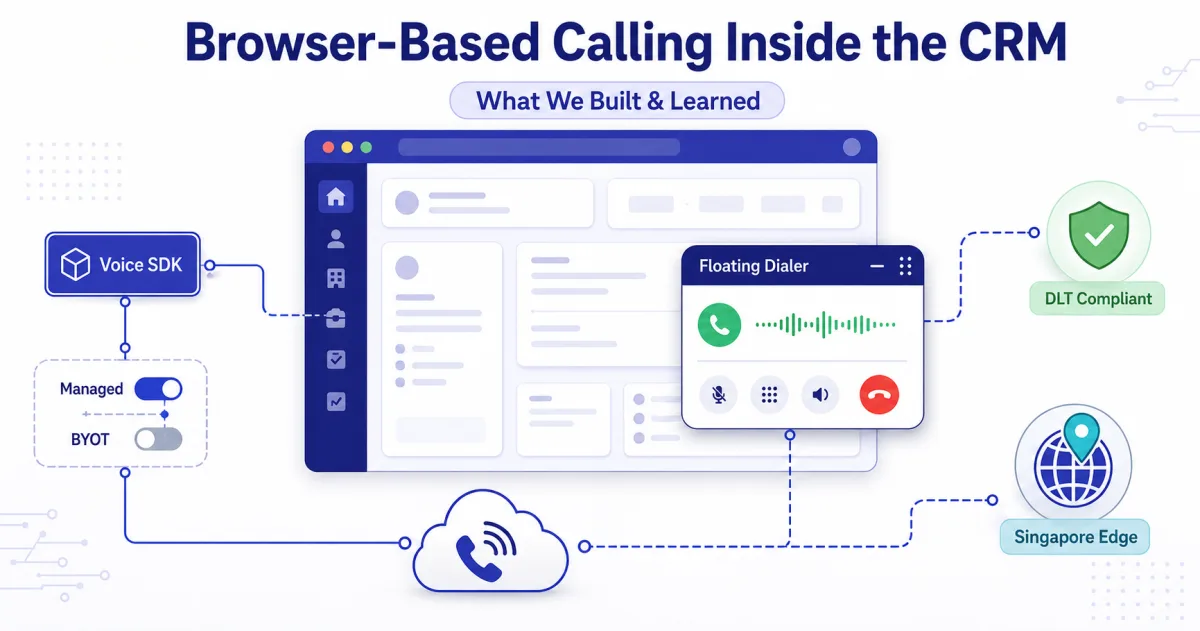
A sales rep typically spends only about 28 percent of the workweek actively selling, with the rest going to admin, search, and tool-switching (Salesforce State of Sales, 5th edition). Dial pad open in one tab, lead notes in another, disposition logged tomorrow if it gets logged at all. We built a phone inside ViveLead so reps stop switching and start closing.
This post is the engineering walkthrough. What we shipped, the tradeoffs, and the bugs we fixed once real calls started landing. We wrote about the user-facing side of this in our AI dialer post.
Why we built this ourselves
Most CRMs in the Indian market either skip telephony or hand it off to a third-party integration that opens in a separate window. That defeats the point. If a rep has to leave the lead screen to dial, you have a dialer, not a calling workflow.
The harder reason: India has DLT (Distributed Ledger Technology) compliance for outbound voice. Every business making outbound calls must register as a Principal Entity on Jio Trueconnect and bind their telephony provider to that PE before a single call goes out. Most foreign-built CRMs do not handle this at all. We had to. The same India-first thinking shaped our WhatsApp CRM and our AI voice dialer.
The architecture in one paragraph
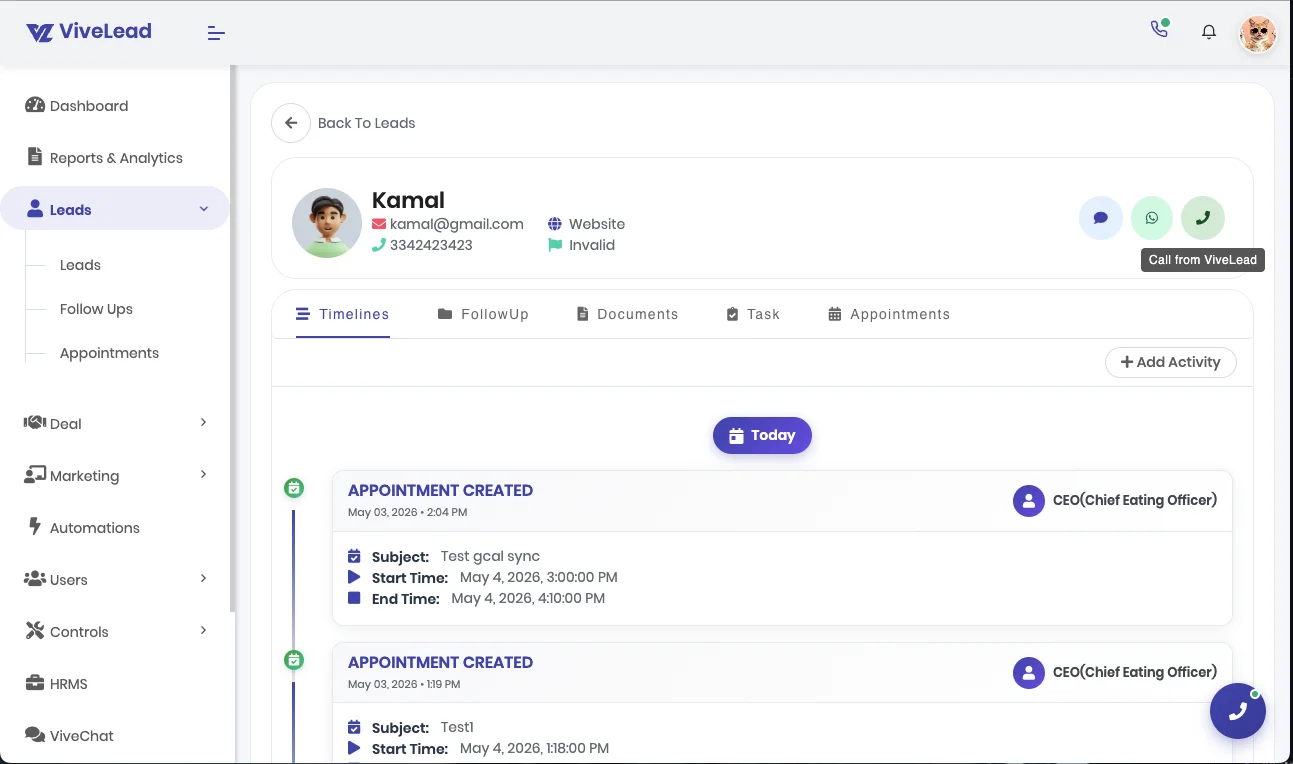
A long-lived TelephonyService (Angular @Injectable({ providedIn: 'root' })) owns the Twilio Device, audio devices, and call state. It exposes RxJS BehaviorSubjects for config$, callState$, activeCall$, incomingCall$, presence$, and a few others. A floating DialerWidgetComponent is mounted in AdminComponent (not AppComponent) so it stays off the auth and public-form routes. The widget subscribes to the service streams and renders the right view: idle bubble, active call panel, or nothing if telephony is not provisioned for the company.
Files worth knowing if you read the source:
src/app/home/admin/telephony/provider/telephony.service.ts. Device, config, presence, all the BehaviorSubjects.src/app/home/admin/telephony/provider/telephony-incoming-binding.service.ts. The Socket.IO + SDK race resolver.src/app/home/admin/telephony/components/dialer-widget/. The floating widget mounted in AdminComponent.src/app/home/admin/telephony/components/incoming-call-modal/. The draggable, non-blocking incoming card.
Twilio Device wiring, with the India-specific bits
const device = new TwilioDevice(tokenData.token, {
  edge: 'singapore',
  closeProtection: true,
  logLevel: 'warn',
  tokenRefreshMs: 30_000,
  enableImprovedSignalingErrorPrecision: true,
  allowIncomingWhileBusy: false,
});
Three of these are deliberate.
edge: 'singapore' is the closest Twilio edge to India. There is no Mumbai edge. Pinning Singapore cuts WebRTC media latency noticeably for Indian agents talking to Indian leads. The default would route through whatever Twilio decides, often via the US.
tokenRefreshMs: 30_000 fires tokenWillExpire 30 seconds before the access token expires so we can mint a new one without dropping the call. We layer a backup on top: a visibilitychange event listener that re-checks expiry whenever the tab regains focus. Backgrounded tabs throttle timers and the SDK’s own tokenWillExpire can fire late.
allowIncomingWhileBusy: false is a UX choice. Letting Twilio queue a second incoming while the rep is mid-call adds confusion that we did not want to design around in v1.
Two billing flavors: Managed and BYOT
Customers split into two camps. Some want zero Twilio account management; we run a sub-account for them and they pre-load a wallet (managed in paise, the smallest unit of Indian rupee). Others already have a Twilio relationship and want to bring their own keys.
The setup wizard branches on this choice. The provision endpoint accepts either nothing (managed mode, BE creates a sub-account) or byotAccountSid + byotAuthToken (BYOT mode, BE binds the existing Twilio account). The backend infers billingMode from whether BYOT credentials are present. We learned this the hard way after sending billingMode: 'byot' in the request body and watching it get silently stripped by the validation pipe.
DLT, the unforgiving part
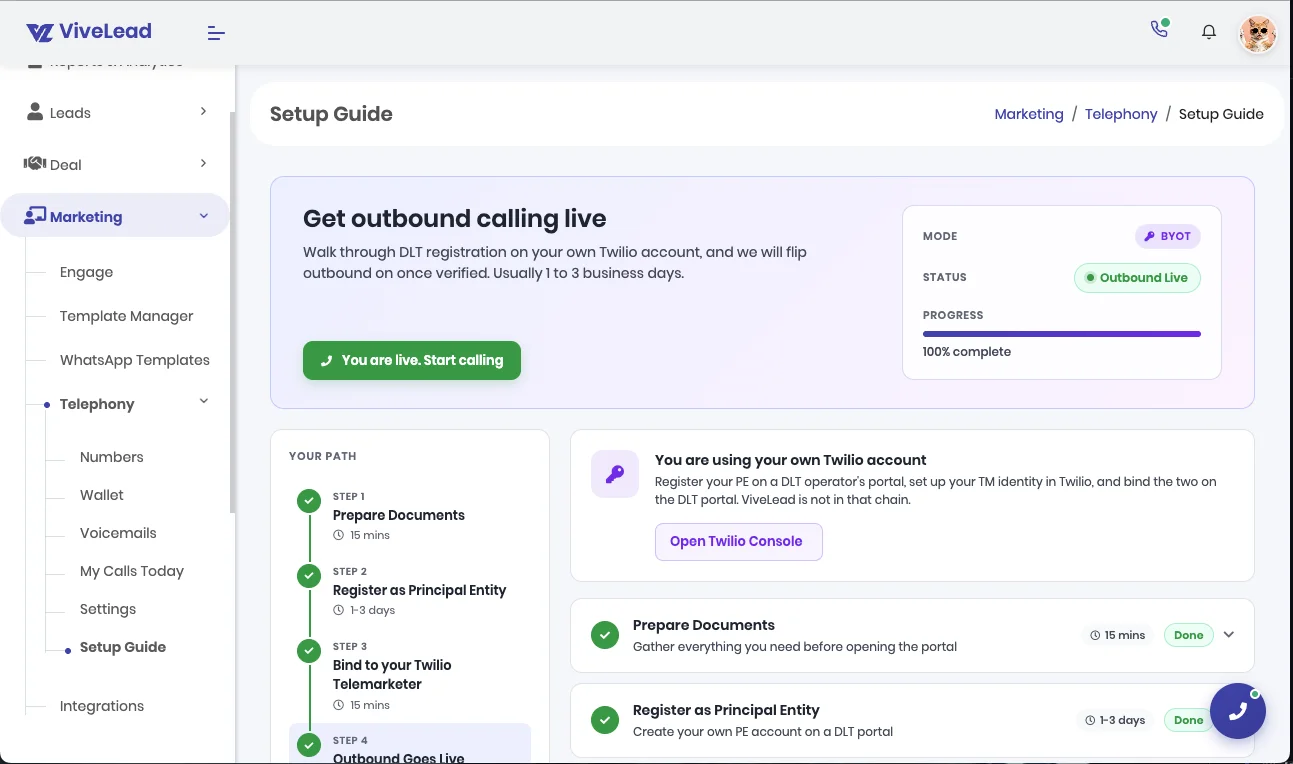
Outbound calling stays disabled until the customer registers as a Principal Entity on Jio Trueconnect and binds their PE to ViveLead. There is no workaround. Twilio will reject any outbound that is not bound to a verified PE, and the error surfaces as a generic Twilio failure that does not tell the user what went wrong.
We solved this two ways. First, the dialer widget surfaces a “DLT pending” badge on every call attempt until the PE binding clears. Second, we wrote a step-by-step in-product onboarding guide rather than asking customers to read Twilio’s documentation. The owner side of ViveLead has a one-click toggle (POST /api/telephony/config/owner/:companyId/outbound-enable) that the team flips after manually verifying the customer’s PE-TM binding.
The inbound binding race
Inbound calls have a race condition that took two passes to get right. When a call hits the customer’s Twilio number, two things happen roughly at the same time:
- Our Socket.IO server fires a
telephony:inboundevent with full lead context (matched lead, last note, stage). - Twilio’s SDK fires an
incomingevent on the Device with the call object and a customCallIdparameter.
Either event can arrive first. We need both to render the modal, because the SDK call object is required to accept/reject and the Socket context has the lead snapshot. The lead snapshot itself comes from our smart lead capture pipeline upstream of this.
The resolver lives in telephony-incoming-binding.service.ts. It maintains two Map<callId, ...> and matches on CallId. If only one side has arrived after 1500 milliseconds, we open the modal anyway with whatever context we have. Worst case the lead snapshot is missing and the rep sees the raw phone number. Better that than missing the call entirely.
const FALLBACK_OPEN_MS = 1500;
The floating, non-blocking incoming-call modal
This is the piece we are most proud of and the one that took the most iteration.
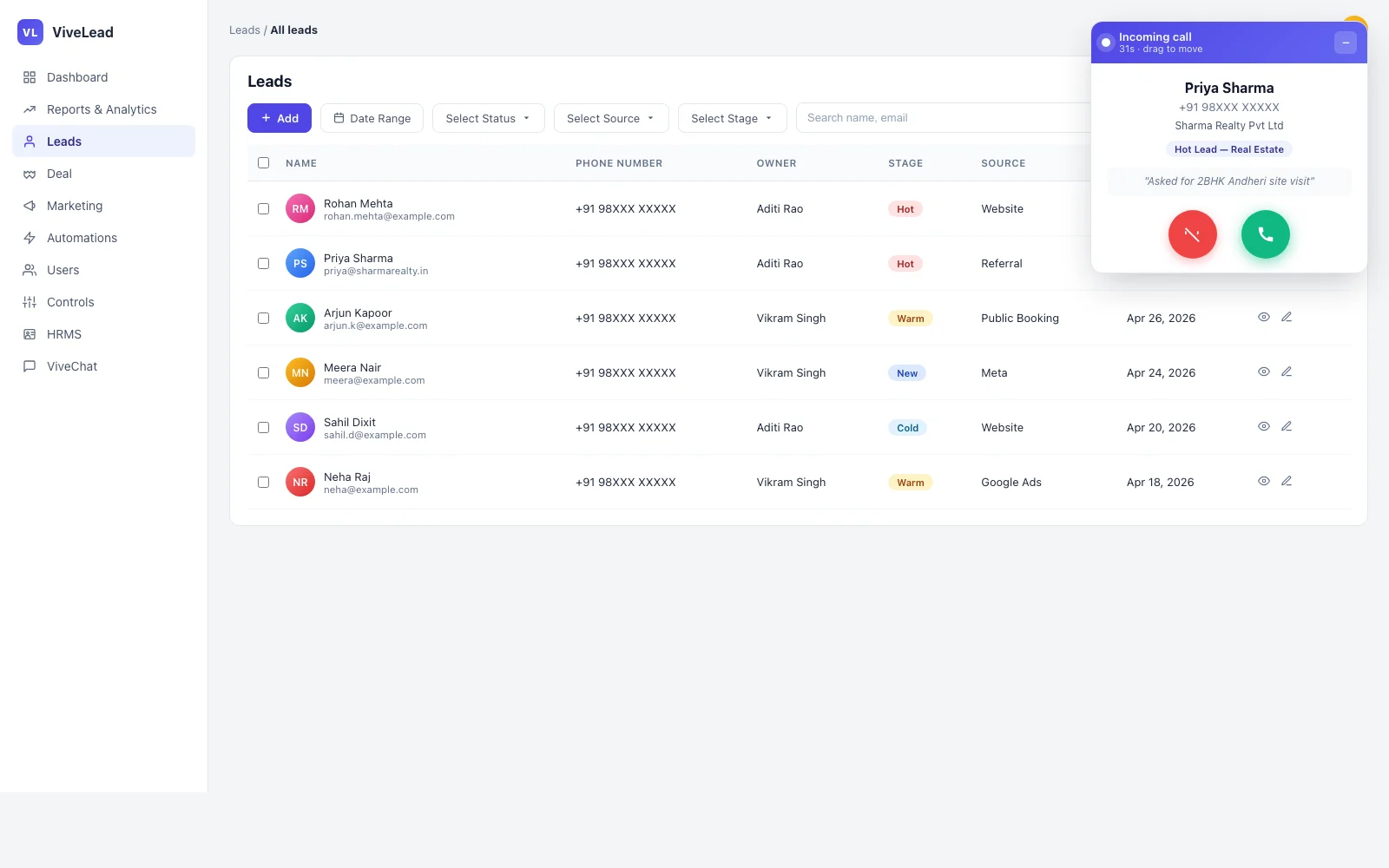
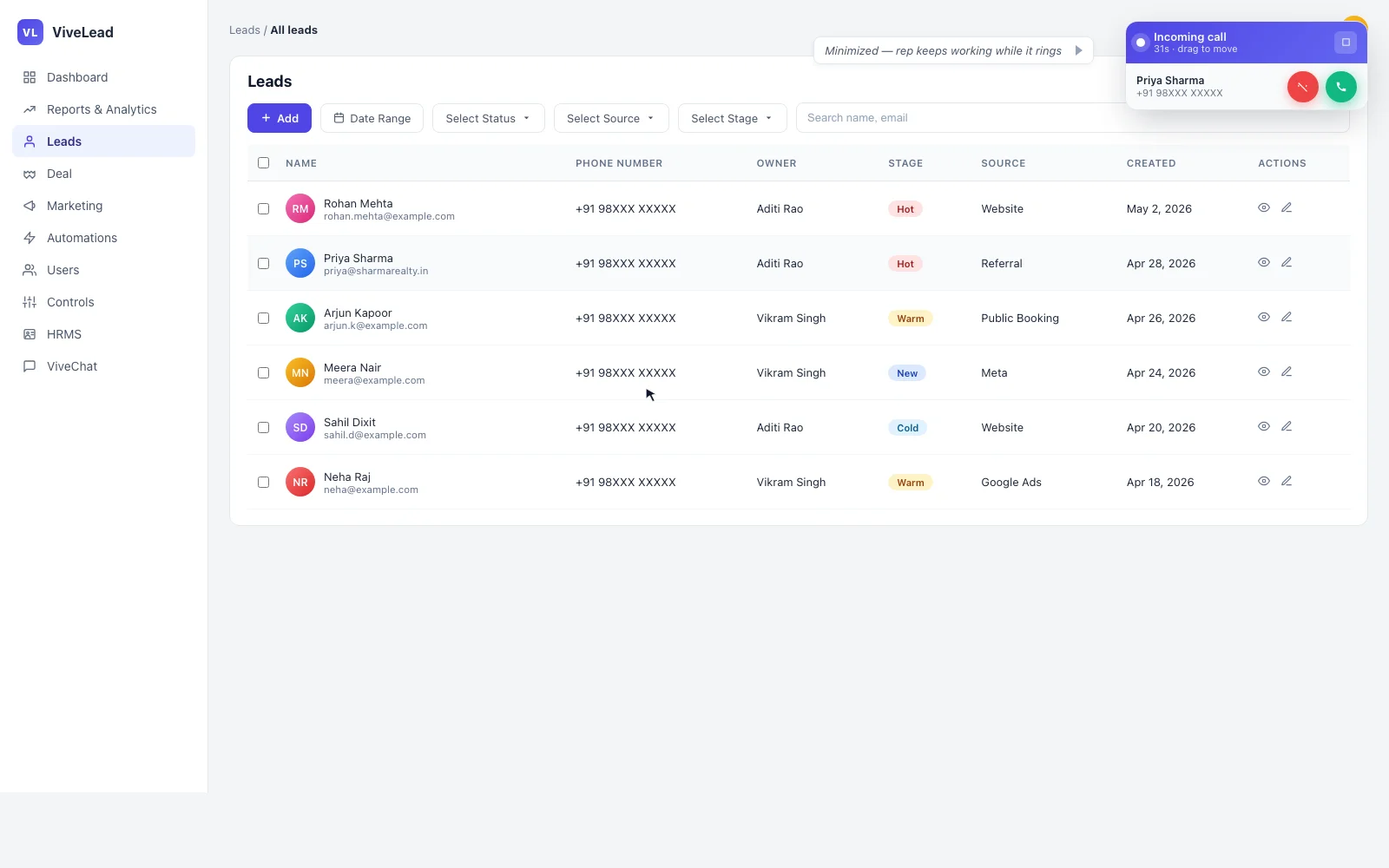
The first version used Angular Material’s MatDialog with disableClose: true. It worked but blocked the entire CRM with a backdrop while ringing. A rep who did not want to pick up the call could not even scroll their leads list. Wrong shape entirely.
We rewrote it as a floating card. Three changes mattered:
hasBackdrop: falseonMatDialog.open()so no overlay covers the rest of the page.position: { top: '24px', right: '24px' }to anchor the card top-right by default.cdkDragwithcdkDragRootElement: '.cdk-overlay-pane'so dragging the header moves the entire dialog pane, not just the inner card.
A global rule in styles.scss strips Material’s default padding and background from the dialog surface so the card fully owns its visual:
.cdk-overlay-pane.incoming-call-dialog {
  width: auto !important;
  max-width: none !important;

  .mat-mdc-dialog-surface,
  .mat-mdc-dialog-container .mdc-dialog__surface {
    background: transparent !important;
    box-shadow: none !important;
    padding: 0 !important;
    overflow: visible !important;
    border-radius: 0 !important;
  }
}
The card has a minimize button. Clicking it collapses the body to a compact pill in the corner with just the caller name, number, and small accept/reject buttons. The rep keeps the rest of the screen for their work.
Two bugs we shipped and then fixed
Auto-close on caller hangup. The first floating-card version forgot to subscribe to Twilio’s cancel, disconnect, and reject events on the Call object. If the caller hung up before the rep accepted, the modal stayed on screen until the rep clicked reject manually. We wired the listeners in the modal’s constructor:
const dismiss = () => {
  this.stopRingtone();
  this.dialogRef.close({ accepted: false, autoClosed: true });
};
this.data.call.on('cancel', dismiss);
this.data.call.on('disconnect', dismiss);
this.data.call.on('reject', dismiss);
Ringtone autoplay. The Twilio SDK’s built-in ringtone fails silently if Chrome’s autoplay policy has not been satisfied (no prior user gesture on the page). We added our own <audio> element looping the existing notification asset at 60 percent volume, with explicit stop calls on every closure path so it does not leak into the next call.
Performance: keeping the Twilio SDK out of the initial bundle
The minified @twilio/voice-sdk is 296 KB shipped to the browser (verified with du -sh node_modules/@twilio/voice-sdk/dist/twilio.min.js). Loading that on every page hurt first-contentful-paint for users who never make a call. We lazy-load via dynamic import inside TelephonyService.doInitDevice():
const { Device: TwilioDevice } = await import('@twilio/voice-sdk');
The SDK only enters the bundle when a telephony-provisioned, telephony-enabled user actually has the dialer ready. Which means it never loads on auth pages, never loads for users without telephony enabled, and never loads for companies that have not connected Twilio yet.
Per-user agent toggle and availability
Not every user in a customer’s account is a calling agent. We added two per-user fields:
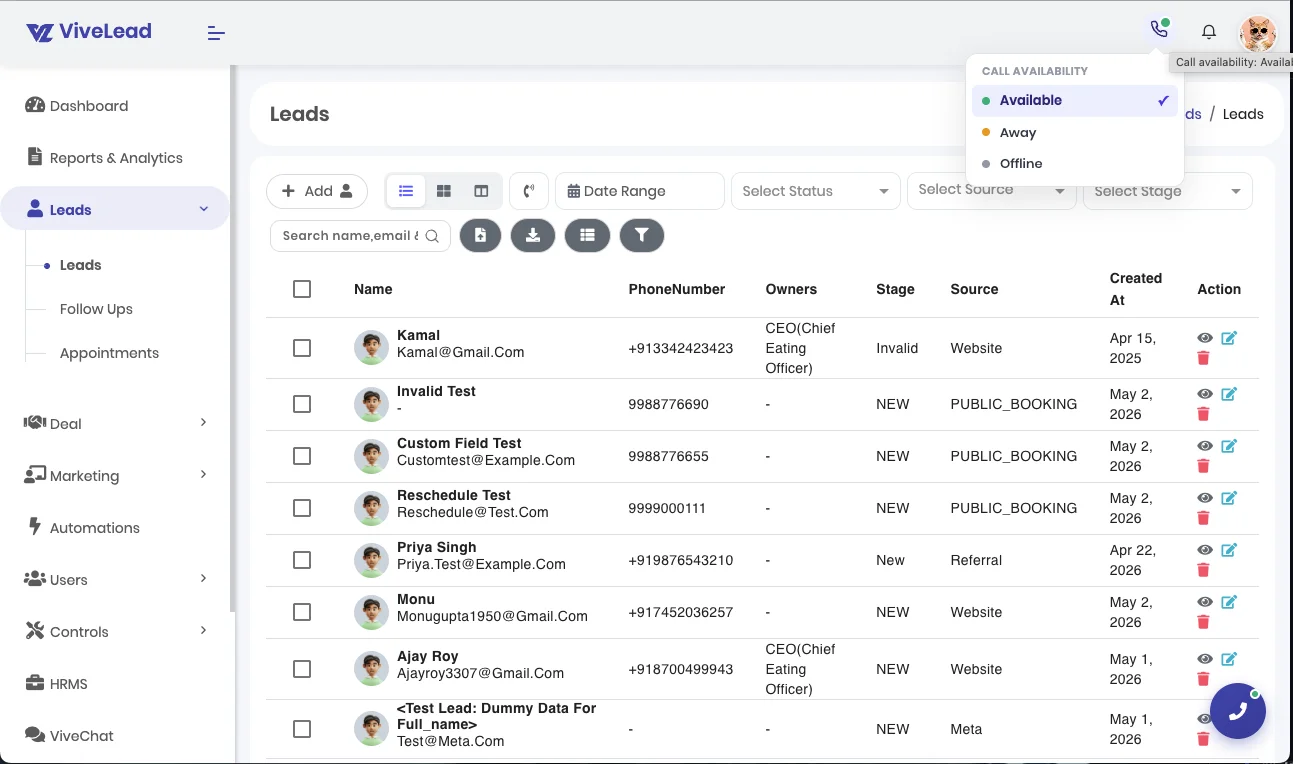
telephonyEnabled(boolean). Is this user a calling agent at all? Toggleable from the admin user-edit dialog and from the user’s own account settings.availabilityStatus(‘available’ | ‘away’ | ‘offline’). Real-time presence, set by the user from a header pill.
Inbound calls only route to users where both telephonyEnabled === true AND availabilityStatus === 'available'. Default availability is offline on every login, by backend rule. That choice is deliberate: agents must opt in each session, otherwise an idle browser tab keeps catching calls.
The header pill is gated on both userInfo.telephonyEnabled and telephony.config$ truthy. No telephony provisioned for the company means the pill does not render at all. Dead UI is worse than missing UI.
What is next
Three things we are exploring, none committed yet:
- AI call summary. Audio transcript plus key points plus sentiment generated post-call. Scaffolding present, model wiring pending.
- Manager listen-in, whisper, and barge.
- Conflict detection. Read the agent’s calendar before suggesting the next callback time on a live call.
Want to use the calling features in your CRM? Book a demo at vivelead.com/contact.
CRM Calling FAQs
Telephony, DLT, and billing inside ViveLead
See the dialer in your CRM
Click-to-call, lead context on incoming, DLT-aware outbound. Book a demo.