Facebook Meta Business Tools for Small Businesses | ViveLead
Connect Meta's Facebook Business Suite with ViveLead CRM. Capture leads from Facebook and Instagram ads automatically. Free trial.
Why Facebook Lead Ads Need a CRM (Not Just a Spreadsheet)
If you’re running Facebook or Instagram ads for your business, you’ve probably seen leads trickle in through Meta’s Lead Ads forms. The problem? Those leads sit inside Meta Business Suite until you manually download them. By the time you export a CSV, open it in Excel, and call the first person, hours or even days have passed.
A widely cited MIT study of more than 15,000 leads, led by Professor James Oldroyd with InsideSales, found you are 21x more likely to qualify a lead when you respond within 5 minutes versus 30 minutes. Every minute your Facebook leads sit uncontacted is money lost.
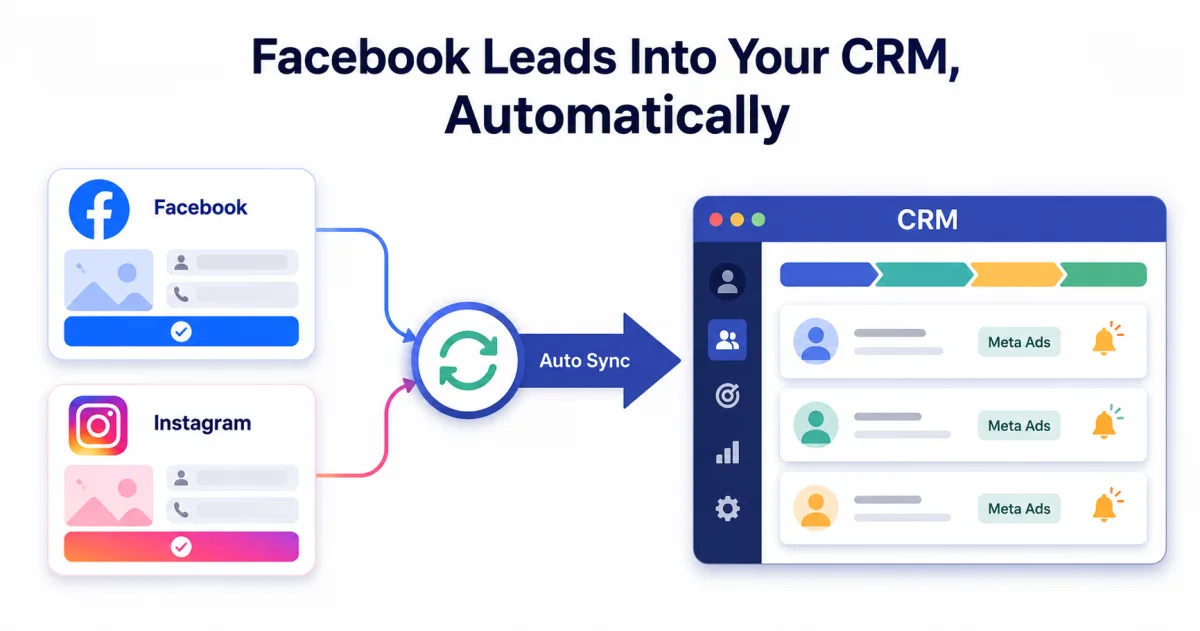
That’s where CRM integration closes the gap. When your Facebook Lead Ads connect directly to your CRM, every new lead appears instantly with source tracking, automatic assignment, and follow-up triggers. No downloads, no CSV files, no delays.
How ViveLead’s Facebook Integration Works
ViveLead connects directly with Meta Business Suite and Facebook Lead Ads. Here’s what happens when someone fills your lead form on Facebook:
- Lead appears instantly in your ViveLead dashboard within seconds
- Source is auto-tagged as “Facebook Lead Ad” with the specific campaign name
- Lead is auto-assigned to the right team member based on your rules
- Automated follow-up triggers: WhatsApp message, email, or SMS sent immediately
- Lead enters your sales pipeline at the right stage automatically
No manual work. No CSV exports. No leads falling through cracks.
Manual Download vs Automated CRM Sync
| Factor | Manual CSV Download | ViveLead Auto-Sync |
|---|---|---|
| Lead response time | Hours to days | Under 60 seconds |
| Source tracking | Basic (campaign name only) | Full (campaign, ad set, ad creative, cost) |
| Follow-up | Manual call/email | Automated WhatsApp + email + SMS |
| Duplicate handling | None (re-downloads create duplicates) | Auto-deduplicated |
| Lead assignment | Manual | Rule-based auto-assignment |
| Conversion tracking | Impossible without CRM | Full funnel visibility |
| Monthly effort | 2-3 hours of downloads + data entry | Zero, fully automated |
Step-by-Step: Connect Facebook Lead Ads to ViveLead
Setup takes under 10 minutes. No coding required.
Step 1: Open ViveLead Integrations
Go to Settings > Integrations > Facebook/Meta in your ViveLead dashboard.
Step 2: Connect Your Facebook Account
Click “Connect Facebook” and authorize ViveLead to access your Meta Business Suite. You’ll need admin access to your Facebook Business page.
Step 3: Select Your Facebook Page
Choose which Facebook Business Page you want to sync leads from. You can connect multiple pages if you manage different businesses.
Step 4: Map Your Lead Form Fields
ViveLead auto-maps common fields (name, email, phone). For custom fields in your lead form, map them to ViveLead’s contact fields like “Budget,” “Course Interest,” or “Property Type.”
Step 5: Set Up Auto-Assignment Rules
Define who gets which leads. For example:
- Leads asking about “MBA programs” go to the Education counselor team
- Leads from Delhi ads go to Delhi sales rep
- Leads with budget over Rs 50L go to Senior agent
Step 6: Configure Automated Follow-Ups
Set up instant responses:
- WhatsApp message with a greeting and brochure link (sent within 30 seconds)
- Email with detailed information about what they enquired
- SMS as a backup if WhatsApp delivery fails
Step 7: Test and Go Live
Submit a test lead through your Facebook form. Verify it appears in ViveLead within 60 seconds with correct field mapping, source tag, and follow-up triggers.
Illustrative Scenarios: How Indian Businesses Could Use This
These illustrate the workflow. They are not customer results.
EdTech Coaching Institute
A UPSC coaching institute in Delhi runs Facebook ads targeting graduates in North India. They get 40-60 leads per day during admission season.
Before ViveLead: Downloaded CSV once daily. Called leads next day. 70% didn’t pick up because they’d already enquired elsewhere.
After ViveLead: Every lead gets an instant WhatsApp message with the course brochure and a counselor call within 5 minutes.
Real Estate Builder
A Gurgaon-based builder runs Instagram and Facebook ads for a new residential project. Leads come from multiple campaigns: 2BHK ads, 3BHK ads, and investment-focused ads.
Before ViveLead: All leads dumped into one Excel sheet. No way to know which campaign generated which lead. Site visit scheduling was manual.
After ViveLead: Leads auto-tagged by campaign type. 2BHK enquiries go to one team, 3BHK to another. Automated WhatsApp sent with project brochure and site visit booking link.
Dental Clinic Chain
A dental clinic chain in Bangalore runs Facebook ads for teeth whitening and Invisalign consultations across 3 locations.
Before ViveLead: Marketing manager downloaded leads weekly. By the time they called, most patients had booked elsewhere.
After ViveLead: Leads from each location’s ads auto-assigned to that branch’s receptionist. An instant WhatsApp goes out with a booking link.
Track Which Facebook Campaigns Actually Work
One of the biggest advantages of CRM integration is attribution tracking. ViveLead doesn’t just capture the lead. It tracks the entire journey:
- Which campaign generated the lead
- Which ad set (audience targeting) worked best
- Which ad creative (image/video) drove the most leads
- The cost per lead from each campaign
- Which campaigns produced leads that actually converted to paying customers
This means you can stop wasting money on campaigns that generate leads but don’t convert, and double down on what works.
Automated Follow-Up Sequences
When a Facebook lead enters ViveLead, you can trigger multi-step follow-up sequences:
Day 0 (Instant): WhatsApp message with greeting + brochure/link Day 0 (5 min later): Auto-assign to sales rep + notification to call Day 1: If no response, send email with more details Day 2: If still no response, SMS reminder Day 3: Sales rep gets a reminder to try calling again Day 7: If lead hasn’t converted, move to nurture sequence
This ensures no lead is forgotten, even when your team is busy with other prospects.
Beyond Facebook: Capture Leads from Every Source
Facebook is just one channel. Most Indian businesses get leads from multiple sources simultaneously. ViveLead captures from all of them in one dashboard:
- Facebook & Instagram Lead Ads: auto-synced
- Google Ads: click-to-call and form submissions
- WhatsApp: business API messages captured
- Website forms: embedded or popup forms
- IndiaMart & JustDial: India-specific lead sources
- Walk-ins: manual entry with source tagging
- Referrals: tracked with referrer attribution
- Phone calls: logged with click-to-call
Learn more about capturing leads from every channel with Smart Lead Capture.
Facebook Lead Ads Integration FAQs
Connecting Meta lead ads to ViveLead CRM
Start Capturing Facebook Leads Automatically
Stop losing leads to slow response times. Connect your Facebook ads to ViveLead and start converting within minutes, not days.
- Instant lead sync from Facebook and Instagram
- Automated WhatsApp and email follow-ups
- Full campaign attribution to track ROI
- Included from Rs 999/user/month on Professional. See all plans
Book a demo to start your 7-day free trial. No credit card required. Setup takes under 10 minutes.
Related Reading
- Best CRM Software in India 2026: Real pricing comparison
- Smart Lead Capture: Capture from 10+ sources
- AI Dialer: Call your Facebook leads from the CRM
Capture Facebook Leads Automatically
Instant sync from Facebook & Instagram. From Rs 999/user/month. 7-day free trial.