Track Remote Reps via SIM Telephony Logging CRM
SIM telephony logging CRM: ViveLead's Android app logs every call your reps make from their own SIM, with recording, straight onto the lead record.

The Day You Find Out Your Best Counsellor Faked Her Follow-Ups
It is intake season. A batch of 200 admission enquiries lands overnight from your Meta lead form and a JustDial listing, and you already know this one batch is most of the quarter’s revenue if the team works it fast. By evening, your best counsellor’s daily report says: 40 called, 12 not interested, 8 not reachable, the rest pending. Clean numbers. You almost do not check.
Then you pick up her phone to spot a follow-up, and you scroll the call log. Six calls actually dialled. Six. The other thirty-four were marked from the dashboard without a single ring. The leads tagged “not reachable” were never reached because they were never called. And the one she wrote off as “not interested” at 11am enrolled at the institute down the road that afternoon, the one whose counsellor called back in two minutes.
This is not a productivity gap. You were lied to. And the worst part is you cannot prove it without physically grabbing a phone, because your only record of what happened is the rep’s own word typed into a box. That is the wound this article is about. You cannot enforce a fast callback on a rep you cannot see calling.
Why “Check the Phone vs the Excel Sheet” Is the Whole Problem
The manager’s actual workflow today
Ask any telecalling or admissions manager how they audit calls right now, and the honest answer is grim: they physically pick up reps’ phones and reconcile the call log against an Excel sheet, just to understand what actually happened that day. TeleCRM’s own marketing describes this exact ritual, managers checking handsets by hand, because it is the shared starting condition of the whole category. Callyzer pegs the cost of it: team leads running 20 to 30 agents can lose around two hours a day chasing and stitching together end-of-day reports.
Now make it real for a 25-rep admissions floor where half the team is remote, on the road, or “just stepped out.” You cannot grab 25 phones. You cannot grab the phone of a rep who is in another city. So you trust the sheet, and the sheet is whatever the rep decided to type.
Self-reporting is the hole every cloud dialer leaves open
The problem is not that you lack analytics. The problem is that you lack ground truth. When activity is self-reported, “I called them” is unfalsifiable. A rep can sit on a hot enquiry, mark it “not interested,” and move on, and nothing in your system contradicts her. The data is only as honest as the person entering it, and intake season is exactly when an overloaded rep is most tempted to clear the queue by marking instead of dialling.
The fix is mechanical, not motivational. Tie the call to the lead automatically, from the device itself, with no cooperation required from the rep. If the call leaves her SIM, it shows up on the lead, whether or not she wants it to. That single change turns “trust me” into “look at the log.”
The 5-Minute Rule, and Why You Cannot Enforce What You Cannot See
There is hard money behind visibility, and the cleanest number on it comes from the Lead Response Management study led by Dr. James Oldroyd at MIT Sloan with InsideSales.com, built on more than 15,000 leads and 100,000 dial attempts. Contact a lead within five minutes versus thirty, and it is roughly 21 times more likely to qualify. Wait past thirty minutes, and the odds of even reaching the person fall off a cliff, often cited as around 100 times lower than at the one-minute mark. The same body of research is where the “the first business to respond tends to win” idea comes from, so treat it as a strong tendency, not an iron law.
Map that onto admissions. An intake lead is perishable in hours, not days. A student who filled three forms tonight belongs to whoever calls first tomorrow morning. So you set an SLA: every new enquiry gets a call inside five minutes. Reasonable. Except an SLA you cannot audit is a wall poster. If you cannot tell whether the rep actually dialled inside the window, “call in five minutes” is a wish, and reps learn fast that nobody is checking. SIM logging is what turns that wish into something enforceable, because now the timestamp on the call is sitting right next to the timestamp the lead arrived.
How SIM Call-Logging Actually Works in ViveLead
Install, grant, and every call ties itself to the lead
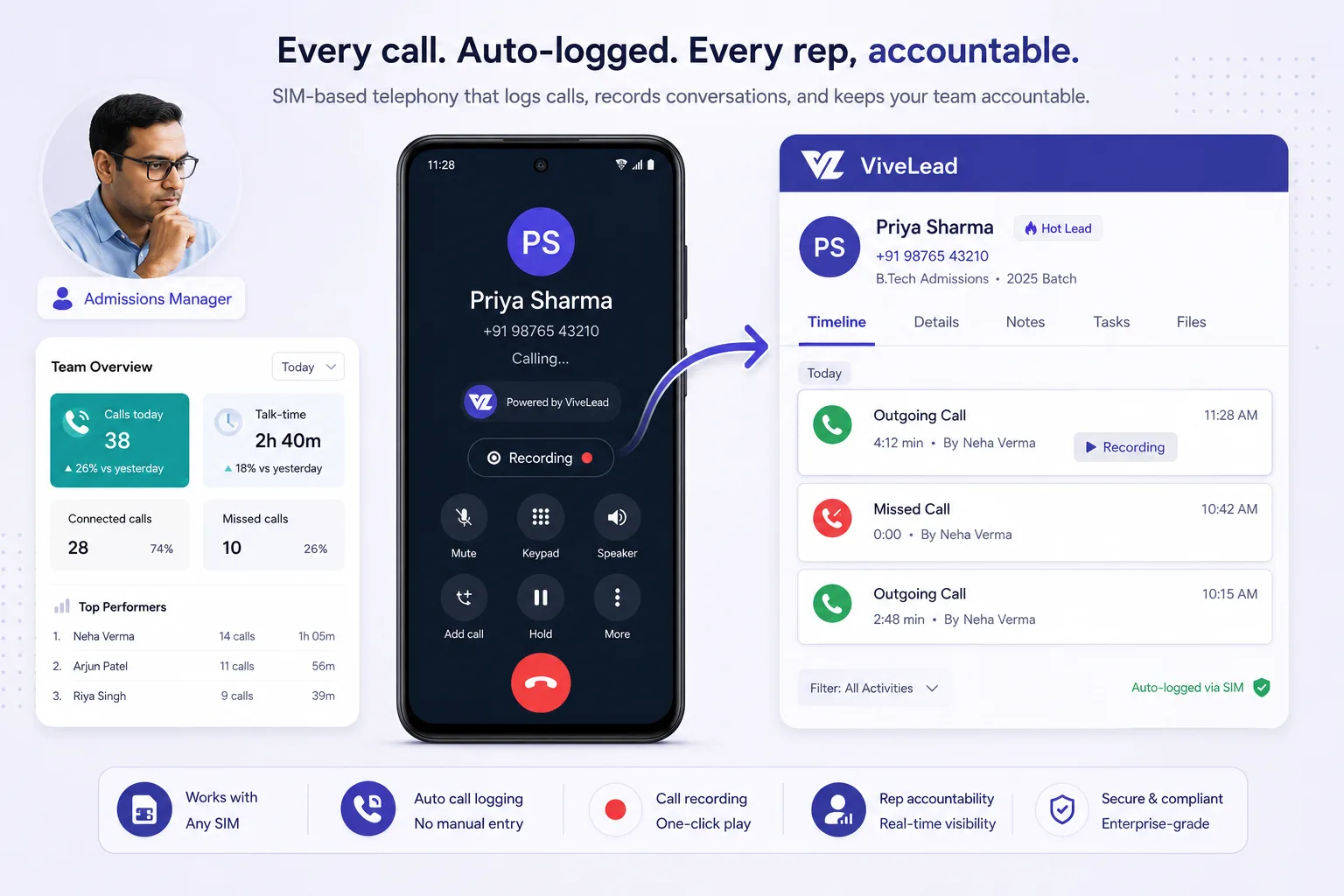
The mechanic is refreshingly plain. The rep installs the ViveLead Android app on their own phone and grants call-log and recording permission once, during setup. From that point, every call on that rep’s SIM, outbound and inbound, syncs to the matching lead record on its own. You get the duration, the timestamp, the direction, the status (connected, missed, or rejected), and the recording where the device and OEM support it.
No cloud number to dial through. No internet-dependent in-app dialer the rep has to remember to use. No self-reporting. The rep dials the lead the way she always has, from her own phone, and the call quietly attaches itself to the right lead. The manager opens one screen and sees who called whom, for how long, with the recording, sitting beside the lead’s deal stage and next task. The argument is over before it starts.
One honesty note up front, because it matters and the category dodges it: the auto-dialer is not part of this. The Android app logs the calls your rep dials by hand on her own number. If you want the system to dial for her, that is cloud telephony, covered below.
Why the call lands somewhere that matters (the CRM, not a monitor)
Here is the wedge against the point tools. In ViveLead the logged call does not land in a standalone call-monitoring dashboard. It lands on a real lead record that already carries the sales pipeline stage, the quotation, the WhatsApp thread, and the next follow-up task. One screen, the whole story.
A pure monitor like Callyzer gives you call data and then still needs a separate CRM to actually run the enrolment lifecycle. That is two tools, two bills, two logins, and a daily reconciliation between them. ViveLead is a CRM, and the SIM logging is one capability inside the lead lifecycle, not a bolt-on you check separately. The call sits where the deal lives.
What SIM Logging Costs: Nothing On Top of the Plan
This is the part most buyers get wrong about us, partly because we wrote it badly ourselves until now.
Cloud telephony is metered everywhere, including here. You rent a number, and then you pay per minute, per started minute in most rate cards, for every call placed through it. For a team of ten making forty calls a day, that meter is a real monthly line item, and it is the reason call tracking gets treated as an expensive feature.
SIM logging has no meter, because there is no number to rent and no minute to bill. The rep dials from the phone and the SIM they already have, on the plan they already pay their carrier for. Our app records that the call happened, for how long, in which direction, uploads the recording where the device allows it, and puts all of it on the lead. Nothing routed through us, so nothing for us to charge per minute for.
So the price is the plan price and nothing else:
| Plan | Metered | |
|---|---|---|
| SIM call logging, recording, dispositions, call history | Starter, Rs 499/user/month | No |
| Cloud telephony: our number, click to call | Business, Rs 1,699/user/month | Yes, per started minute |
The line we draw is dialling, not tracking. If we place the call, that is the paid product. If your rep places it on their own SIM and we write down what happened, that comes with the plan.
Two honest limits. It is Android only, because iOS does not let any app read the call log, and no CRM can work around that. And recording depends on the handset and the OEM: some Android builds allow it, some do not, and where the phone refuses you still get the log, the duration and the outcome, just not the audio.
SIM Logging vs Cloud Telephony: Pick the Right Tool for the Right Rep
Keep the rep’s real number so leads actually pick up
There is an argument the SIM-logging camp owns, and it is worth saying loudly: a call from the rep’s real local mobile number gets answered. An unknown cloud or VoIP number gets ignored or flagged as spam, and post-DLT, Indian buyers screen unknown and 140-series numbers hard. A parent deciding on a school is not picking up a number that looks like a robocall.
So for an Android field or remote rep, SIM logging is the best of both worlds: the lead sees a human, local number they will actually answer, and you still get the full audit trail. You do not trade pickup rate for visibility. You keep both.
When you actually want cloud telephony instead
Be honest about the split, because SIM logging is not the answer to everything. Cloud telephony is the right call when you need centralised recording on every single call regardless of the rep’s handset, inbound call routing and voicemail, or when the rep is on an iPhone. A true auto-dialer that works through a list also lives in the cloud, but ViveLead does not have one: its cloud telephony is Twilio click-to-call, on the Business plan at Rs 1,699 per user per month, billed per use, on ViveLead’s Twilio account or your own.
The decision is not ideological. It is: which rep, which phone, which job. Field counsellor on Android who needs to be picked up: SIM logging. Inside tele-caller at a desk, or anyone on an iPhone: cloud telephony. A desk that blasts a list all day needs a dedicated power dialer, which ViveLead does not have.
The comparison, side by side
Real prices below, with vendor marketing claims labelled as their claims, not independent facts. Verify any figure on the vendor’s own current page before you buy, because pricing moves.
| What to compare | ViveLead | Runo | TeleCRM | Callyzer | NeoDove |
|---|---|---|---|---|---|
| SIM call logging (Android) | Yes, via the Android app | Yes (its core pitch) | Logs SIM calls, but their page states personal-SIM calls are NOT recorded | Yes (this is the whole product) | Yes |
| Records personal-SIM calls | Device/OEM dependent, stated honestly | Claimed (“only native SIM platform”, their claim) | Their page says NO for personal SIM calls | Recording-focused, but not a CRM | Limited |
| Full CRM (deals, quotes, WhatsApp inbox) | Yes, a real CRM the call lands inside | Thin CRM around a dialer | Telecalling-first, lighter CRM | No, it is a call monitor, not a CRM | Dialer-first |
| iPhone path | Cloud telephony (Twilio) click-to-call | Limited | Limited | Not a CRM | Cloud/VoIP add-on |
| Entry price (researched, labelled) | Rs 499 Starter / Rs 1,699 Business (cloud telephony) | ~Rs 599/user entry, annual | ~Rs 799/user annual + Rs 200 chat sync | Demo-gated, no public price | ~Rs 19,999 to Rs 29,999/yr flat |
| WhatsApp cost | Professional Rs 999, Meta bills per message direct, no markup | Add-on | ~Rs 1,999 WhatsApp setup (their page) | Not applicable | WhatsApp an extra |
| Hidden add-ons | Telephony billed per use; HRMS optional +Rs 99 | Per-user, annual | Chat sync + WhatsApp setup stack on top | Separate CRM still needed | WhatsApp / IVR / VoIP extra |
“I Tried This and It Broke”: The Four Objections, Answered Straight
“Call recorders stopped working on my phones”
This scar is real, so let me meet it head-on. Google’s Accessibility-API policy change, effective 11 May 2022, killed most third-party Android call recorders overnight. Recording has also been restricted by default since Android 10 and 11. Native and OEM recording still works on some Pixel and Samsung builds, but it is not universal.
So here is the straight answer: ViveLead captures recording via the Android app, and availability depends on the device and OEM. We do not promise recording on every handset, because no honest vendor on Android can. Metadata, the number, duration, timestamp, direction, and status, logs reliably across devices. Audio recording is the device-dependent part. If a competitor swears every call on every phone records perfectly, weigh that against what the platform actually allows.
“It’ll become shelfware while my real CRM lives elsewhere”
Documented TeleCRM reviews describe teams reverting to spreadsheets, which is what happens when a tool sits outside the system people actually work in. ViveLead avoids that for a structural reason: the SIM log lands inside the CRM the team already lives in, next to leads, follow-ups, and WhatsApp. It is not a separate app nobody opens. The call data shows up exactly where the counsellor is already working the lead, so there is no second tool to abandon.
“Support vanished after the sale”
This is a recurring category complaint, with documented reviews citing issues never being attended to after purchase and WhatsApp bots quietly breaking. ViveLead’s support is Mon to Sat, 10am to 7pm IST, with free onboarding and free data migration. That is the real window, not a “24/7” claim we cannot back. You get a human during business hours and help setting it up, which is more than the sold-then-abandoned pattern this category is infamous for.
“Half my team is on iPhone”
Plainly: SIM logging is Android-only, because iOS restricts third-party access to the call log, and no CRM can engineer around that. The ViveLead app itself is on both Android and iOS, but the SIM-logging capability specifically is Android. For your iPhone counsellors, the path is cloud telephony (Twilio) with a click-to-call number, where the call is placed and recorded through the cloud. Saying this clearly is the point. A vendor who implies SIM logging works on iPhones is selling you a problem you will discover after you pay.
Recording Calls on Staff Phones, Legally (the DPDP Differentiator)
The category dodges this, so we will lead with it. First and clearly: this is not legal advice, and you should check with your own counsel before you roll anything out.
Three laws frame call monitoring in India: the Indian Telegraph Act 1885, the IT Act 2000, and the Digital Personal Data Protection (DPDP) Act 2023. Legal explainers, including DLA Piper’s and Callyzer’s own write-up, converge on the same practical shape. DPDP requires consent that is free, informed, and specific. Verbal is not enough, and consent buried in an unread employment contract does not qualify.
Compliant employee call monitoring comes down to three concrete steps:
- A written policy stating exactly what is collected, why, and how long it is retained.
- A team briefing before you switch it on, so nobody is surprised.
- A signed employee acknowledgment on record.
The nuance that matters: logging call metadata (number, duration, timestamp, direction, status) is treated more leniently as operational metadata, while recording the audio carries stricter consent and customer-notification duties. And personal calls on a personal SIM, outside work, are off-limits unless your policy explicitly and fairly covers them. That last point is the answer to your rep’s real worry, “you are recording MY phone?” No, you are logging business calls under a policy she signed, not her private life.
On timelines and penalties, hedge honestly, because the law is not fully operational yet. The substantive obligations and the Data Protection Board are expected to be enforceable around 2027, with penalties reported up to Rs 250 crore for serious violations. Separately, TRAI fines for unsolicited commercial calls have been reported up to Rs 2 lakh. ViveLead supports GDPR principles, IT Act 2000 alignment, SSL/AES-256 encryption, RBAC, and data handling per Indian norms. We do not claim SOC 2, ISO 27001, or FERPA. Get the policy and the signed acknowledgment right, and you protect both the rep and yourself.
What This Costs in ViveLead
No fuzz, exact mapping.
- SIM call logging with recording is the Android app capability available with the calling setup, and the call lands on the lead record. The recording piece is device and OEM dependent, as above.
- Core CRM, leads, Meta lead capture, follow-ups, and the mobile app (Android and iOS) start on Starter at Rs 499/user/month. This is the lead the call attaches to.
- WhatsApp Business via the official Meta API (connect your own WhatsApp Business Account, templates, broadcasts, shared team inbox; Meta bills per delivered message direct to your account, with no markup from us) is on Professional at Rs 999/user/month, which also adds invoicing, workflow automations, and lead scoring.
- Full cloud telephony (Twilio: numbers, click-to-call, dispositions, voicemails, call logs) is on Business at Rs 1,699/user/month, billed per use, on ViveLead’s Twilio account or your own.
- The HRMS and payroll module is an optional add-on at +Rs 99/user/month (Rs 79 yearly) on any plan, with PF, ESIC, and TDS.
- Three-day free trial, no credit card. ViveSmart AI comes with the Business plan.
Contrast the stack honestly. A typical TeleCRM setup reads Rs 799 plus Rs 200 chat sync plus Rs 1,999 WhatsApp setup, per their own page. NeoDove runs a flat sticker of roughly Rs 19,999 to Rs 29,999 a year with WhatsApp, IVR, and VoIP charged on top. Read the add-on lines before you sign, on any vendor, including the bits and pieces that turn a low headline price into a real bill.
The Bottom Line: End the Argument
Strip away the feature talk and this is about one wound: a manager who cannot tell whether her best counsellor called 40 leads or 4. The win here is not “analytics.” It is one screen that proves who called, for how long, with the recording, tied to the exact lead, so “I called them” stops being a debate and becomes something you can check in five seconds. And because the rep keeps her own real, local number, the leads actually pick up, which is the other half of the problem most tools ignore.
Do it for a week before you believe me. Start the 3-day trial, install the ViveLead Android app on one rep’s phone, and watch the calls tie themselves to leads. Keep the honest limits in view: SIM logging is Android-only, recording is device-dependent, and the auto-dialer is cloud telephony on Business. But for tracking the calls your reps make from their own phones, that one screen is the difference between trusting a sheet and seeing the truth.
Frequently Asked Questions
SIM Telephony Logging CRM FAQs
The real questions telecalling and admissions managers ask, answered honestly
Related reading
- Best time to call a lead in India. 7,989 outbound calls out of this same log: the answer rate is flat all day, and four in five leads are called once and never again.
- Browser-based calling inside your CRM
- WhatsApp CRM in India: Buyer’s Guide
- EdTech demo-to-enrolment playbook
- Why generic CRMs fail EdTech
- Excel vs CRM for lead tracking
- CRM under Rs 500 in India
- Pricing
EdTech CRM by city: Delhi NCR, Mumbai, Bangalore, Hyderabad, Chennai, and Pune.
End the 'I Called Them' Argument
Start the 3-day trial, install the ViveLead Android app on one rep's phone, and watch SIM calls tie themselves to leads. SIM logging and recording are on Starter at Rs 499/user/month, no telephony bill. No credit card required.
Continue Reading
Increase Student Enrollment in EdTech: Math, Not Ad Spend
Increase student enrollment without more ad budget: six conversion levers, the enrollment-lift math, and the ViveLead …
The EdTech CAC Crisis: Buying More Leads Won't Save You
CRM software for education industry that cuts your real cost per enrolled student: speed-to-lead, less leakage, cost per …
LMS (Lead Management System): What It Does and Costs in India
LMS in sales means lead management system, not learning management system. What one does, who buys it in India, and real …