The Parent Who Inquired at 9pm
Enrolled Elsewhere by Morning.
Students and parents message more than one institute, and they join the one that answers first. ViveLead's AI replies to every inquiry on WhatsApp in seconds, day or night. Your counsellors take over to close, and every follow-up sits on one timeline you can see.
The Real Problems EdTech Companies Face
You built a great course. But growing enrollment is a different game entirely.
Counsellors Reply Slow, Inquiries Leak
A parent fills your website form or messages on WhatsApp. Your counsellors see it hours later, often the next day. By then the parent has spoken to two other institutes. This lead leakage happens every single day, and nobody sees it happening.
No Visibility on Your Enrollment Funnel
How many inquiries came in this week, at each centre? How many converted? Which course is getting the most interest? If the answer means asking every centre head for their own sheet, you have a problem.
Managing Staff Is a Separate Headache
You are running a CRM for students and a separate tool for teacher attendance, leave tracking, and payroll. Two systems, double the cost, and none of them talk to each other.
One Platform for Student Inquiries and Staff Management
Replace spreadsheets and WhatsApp groups with one system. Here is what changes.
Capture Every Inquiry Automatically
Website forms, WhatsApp messages, Facebook ads, walk-ins. Every inquiry lands in one place with the source tracked. Lead leakage stops at the door.
AI Replies on WhatsApp in Seconds
A new inquiry gets an instant WhatsApp reply from ViveLead's AI. It answers from your course information, asks the qualifying questions, and books the counselling call. Day or night. A counsellor can take over any chat and the AI steps back.
Counsellor Allocation on Autopilot
Inquiries get distributed to counsellors by course, centre, or workload. No manual assignment, no favourites, no inquiry sitting with nobody.
Automated Follow-up Sequences
WhatsApp and email reminders go out on schedule. If a parent asked about your Python course but didn't enroll, they get a nudge 3 days later.
Pipeline and Source Analytics
See every student's journey from inquiry to enrollment, and which channel actually brings admissions. Cost per inquiry and per enrollment, by source.
Ask Your CRM Anything
Ask ViveLead's AI from ChatGPT or Claude: 'How many inquiries came from Delhi this month?' and get an instant answer. No dashboards to navigate.
Every Centre Runs on Its Own. You See All of Them.
Each centre gets its own inquiries, counsellors and centre head. The head office sees every centre together, or one at a time. These screens are from a demo account with six branches.
- 1
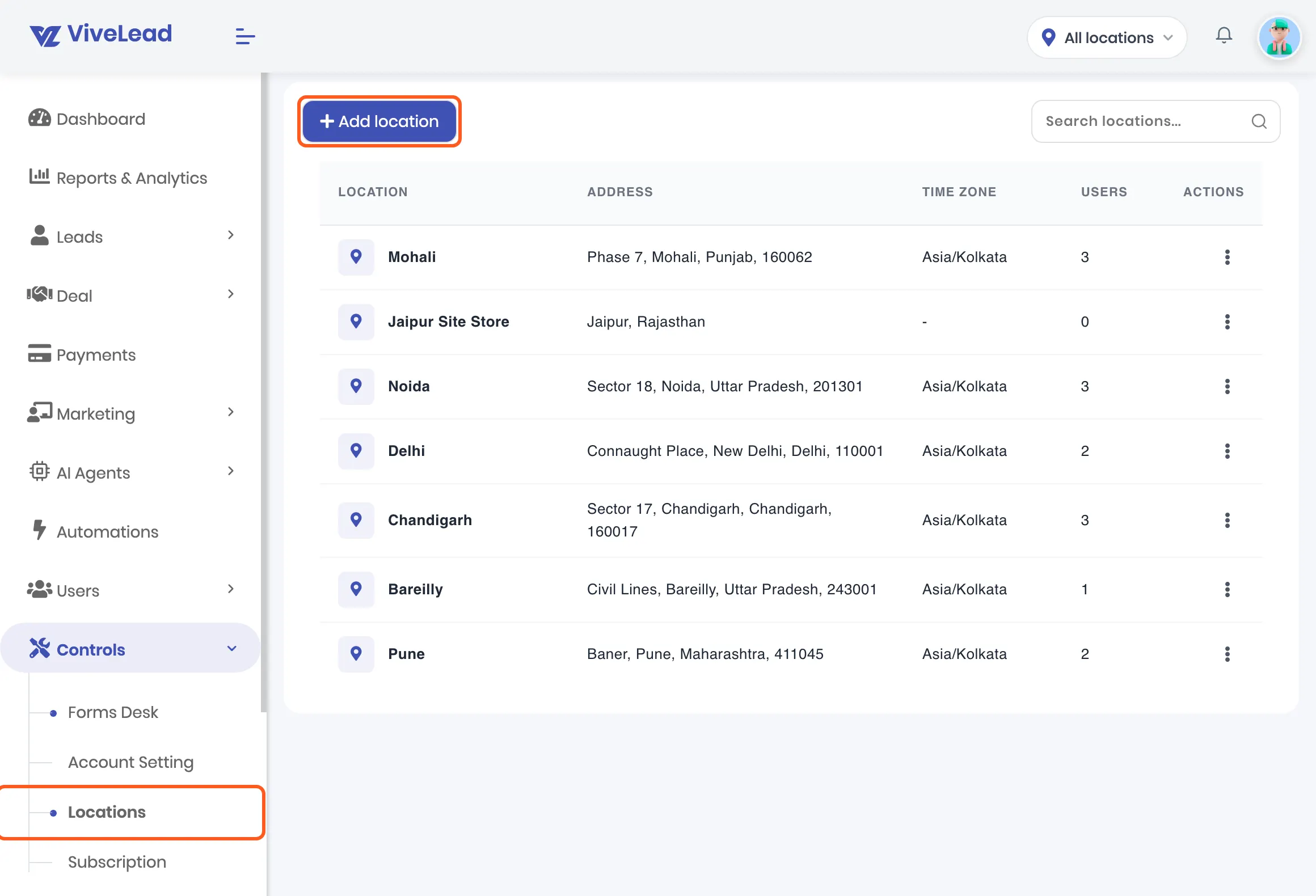
Add each centre as a location
Under Controls, then Locations, add every centre with its address and time zone. The list shows how many people work at each one.
- 2
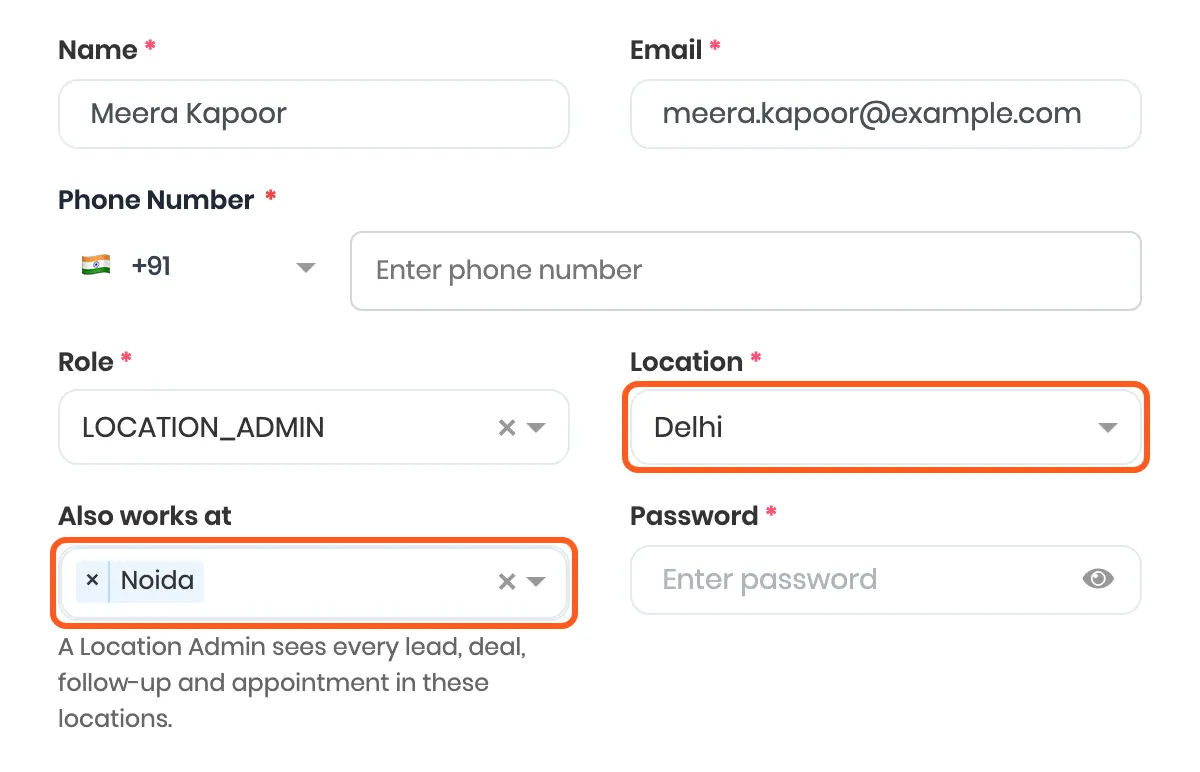
Put counsellors in their centre, and give the centre head their own view
Each person has a home centre, and anyone who covers two centres gets both. A centre head on the Location Admin role sees every inquiry, follow-up and counselling appointment in their centres, and nothing from the others.
- 3
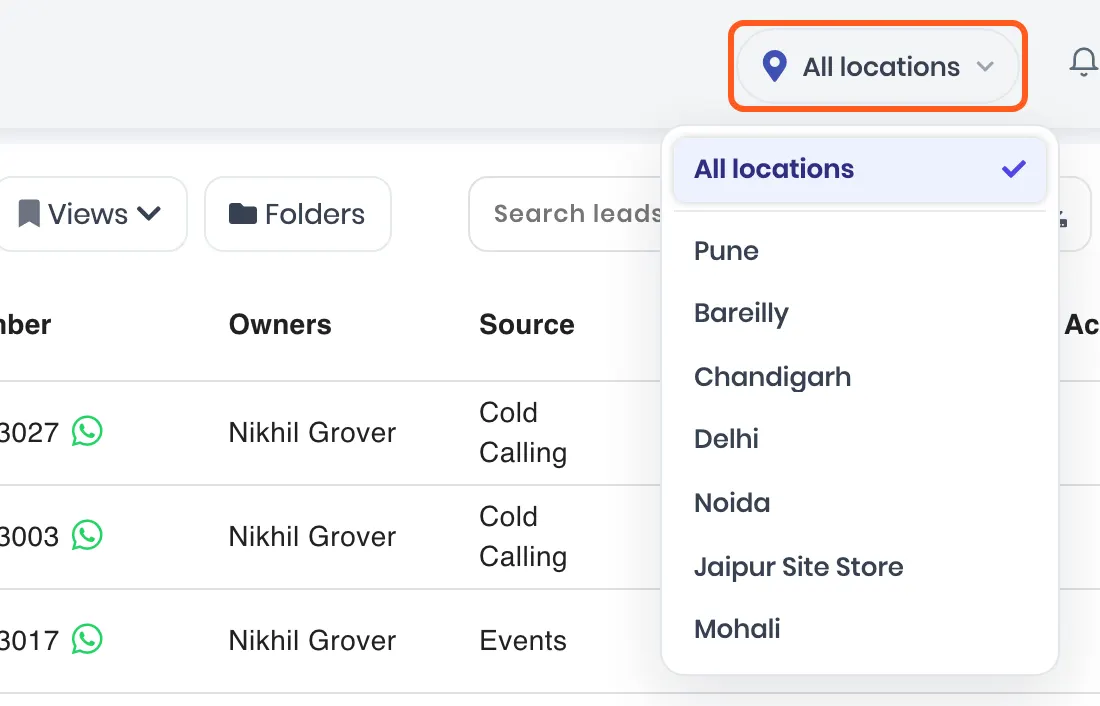
Look at one centre, or all of them
The location picker at the top narrows the inquiry list, follow-ups, appointments, reports and the dashboard to one centre. Set it back to All locations to compare them. New inquiries a counsellor adds go to the centre that is picked.
- 4
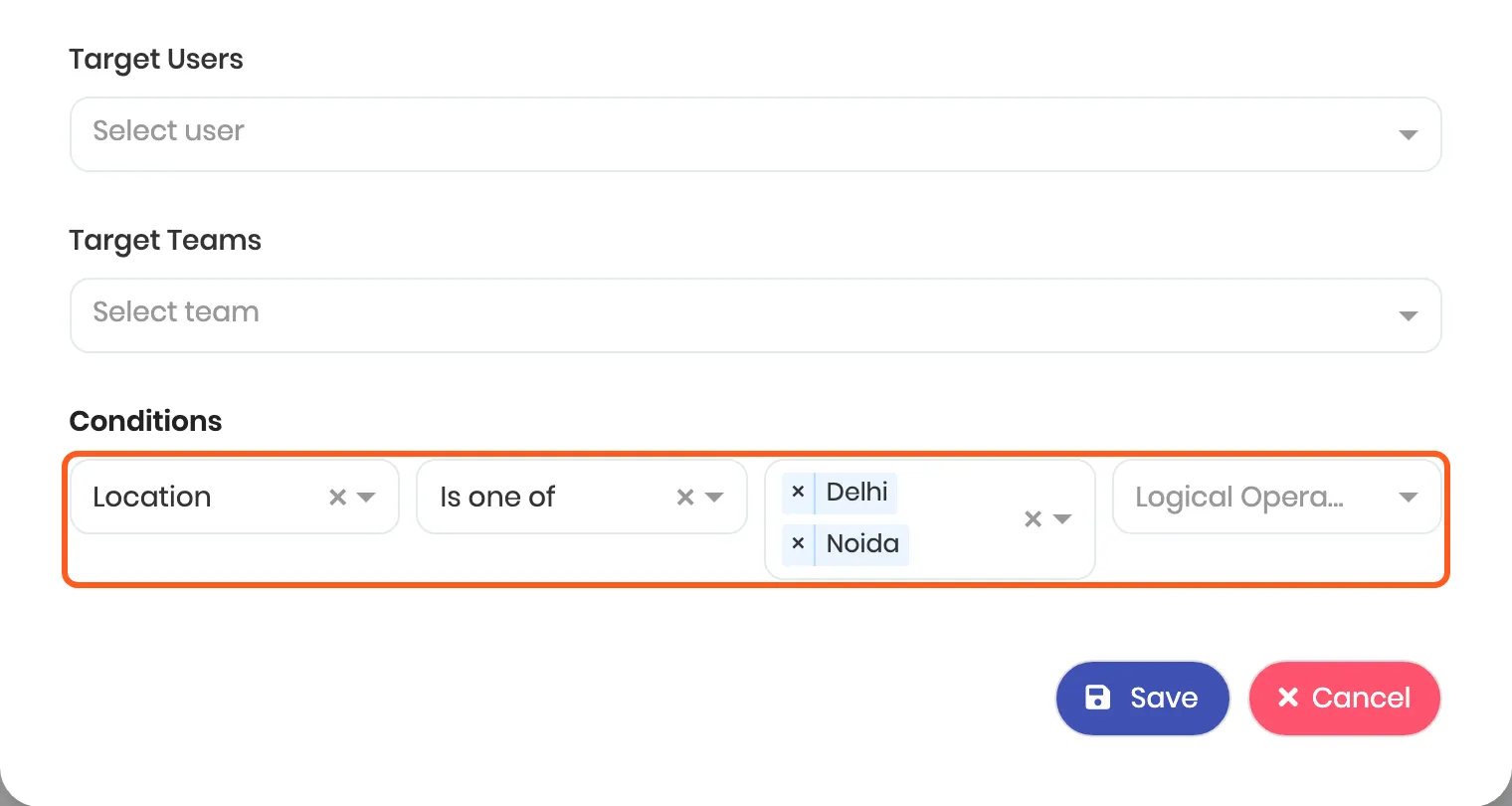
Send each centre its own inquiries
A lead routing rule can match on the centre, so inquiries for Delhi and Noida go straight to that team's counsellors, in turn or to whoever is least busy.
Who sees what
| Role | Sees | Does not see |
|---|---|---|
| Owner or admin | Every centre's inquiries, counsellors and reports | Nothing is hidden |
| Centre head (Location Admin) | Everything in their own centres, and the people who work there | Other centres, and payroll |
| Counsellor | The inquiries they own or created | Other counsellors' inquiries |
Multiple centres are part of the Business plan: Rs 1,359 per user per month billed yearly, or Rs 1,699 billed quarterly. The mobile app does not have the location picker yet. The full setup, step by step: Run several branches from one ViveLead account.
Add HRMS When You Need It. +Rs 99/user.
Your EdTech company also has employees. Teachers, admissions counsellors, support staff. When you are ready to manage them, add HRMS to your CRM.
Most coaching institutes use one tool for student management and another for staff attendance, leave, and payroll. That means two subscriptions, two logins, and data that never connects. With ViveLead, add the HRMS module to your CRM for just Rs 99 per user, far less than a standalone HR tool, and both live in one login.
Get Started in 3 Steps
No complex setup and no technical team. After a short demo we open your account, and these are the first three steps.
Connect Your Lead Sources
Add your website forms, connect WhatsApp, and link your Facebook page. All inquiries start flowing into ViveLead automatically.
Set Up Your Enrollment Pipeline
Create stages like Inquiry, Demo Scheduled, Trial Class, Fee Discussion, Enrolled. Customize it to match how your admissions team actually works.
Add Your Team
Add your counsellors and teaching staff, each with a role and a home centre. Set up attendance tracking if you use HRMS, and run everything from one dashboard.
Trusted by Growing EdTech Companies
Frequently Asked Questions
Common questions about ViveLead for EdTech and coaching institutes
Yes. You can create separate pipelines for different courses or programs. Each pipeline has its own stages, so your Python course enrollments and your Data Science bootcamp have their own tracking. Your team can filter and view inquiries by course at any time.
Yes, on the Business plan. Add each centre as a location, put every counsellor in their home centre, and make each centre head a Location Admin, who then sees only their own centres. The head office switches between one centre and all of them from the top of the dashboard, and routing rules can send each centre its own inquiries. Payroll stays with the head office admin.
ViveLead connects to the WhatsApp Business API directly through Meta, with AiSensy available for higher message volumes. You can send approved template messages, schedule follow-up reminders, and broadcast updates to groups of prospects. When a parent inquires about a course, they can automatically receive a welcome message with course details. Meta bills message charges directly to your WhatsApp Business account.
Yes. ViveLead's AI auto-reply answers new WhatsApp inquiries in seconds using your course information. It handles the first questions, asks qualifying details like class, stream, and budget, and keeps the conversation warm until a counsellor picks it up. A counsellor can take over any chat and the AI steps back for that conversation. You control the AI per chat, and every message stays on the student's timeline.
Yes. Give each agent or channel partner a ViveLead form link to submit student leads. Each lead is tagged with its source, so you always know which agent sent which student. Commission tracking on closed enrollments is built in, and the client portal lets students upload documents against a checklist you define, useful for study abroad and admissions paperwork.
Yes. The HRMS handles both full-time and part-time staff. You can set up different shift schedules, track attendance for hourly workers, and configure separate payroll structures. Many coaching institutes use it for their visiting faculty.
Every inquiry in ViveLead is tagged with its source, whether it came from Facebook ads, Google, your website, a referral, or a walk-in. The analytics dashboard shows you cost per inquiry and cost per enrollment by channel, so you know where to spend your marketing budget.
ViveLead costs Rs 399, Rs 799 or Rs 1,359 per user per month on the Starter, Professional and Business plans billed yearly (Rs 499, Rs 999 or Rs 1,699 billed quarterly), with an optional HRMS and payroll add-on at Rs 99 per user. Running several centres needs Business. LeadSquared lists its Sales Pro plan at Rs 2,500 per user per month billed annually, and Kylas prices its paid plan as a flat monthly fee rather than per user (both checked on 11 October 2026). Ask each for a quote at your team size and compare the yearly total.
After a short demo we open a 7-day trial for you. In it you import your existing student data from a spreadsheet, set up your enrollment pipeline, and connect your lead sources. Our team helps with data migration for free on every plan, and how long that takes depends on how complex your data is.
Your next inquiry gets a reply in seconds. Start today.
Start your 7-day free trial. No credit card required. Setup in 5 minutes.