The Policy Was Sold Last Year.
The Renewal Went to Someone Else.
A renewal is the cheapest sale an agency makes, and the easiest one to miss. ViveLead keeps each customer's policy, insurer, premium and renewal date on their lead, with every call, document and WhatsApp message, so your team can see who renews this month and call them first.
Where Insurance Sales Slip
Getting enquiries is not the hard part. Following up on hundreds of quotes and renewals across a team is.
Renewal Dates Live in a Sheet
Policies sold last year sit in an Excel sheet or the insurer's portal. Nobody opens it until the customer calls to say another agent already renewed it.
Quotes Go Out, Follow-ups Don't
A telecaller shares three quotes on WhatsApp and moves on. A week later there is no record of who was called, what was said, or which insurer the customer liked.
KYC Arrives in Pieces
The PAN in one chat, the RC copy in another, the signed proposal not at all. Before the policy can be issued, someone scrolls through chats to work out what is missing.
One Place for the Customer, the Policy and the Renewal
Each customer is a lead. Their policy, calls and documents stay on it.
Every Enquiry in One List
Website forms, Facebook and Instagram lead ads, WhatsApp, referrals and walk-ins land in one list with the source on each, so you know which campaign brought which customer.
Calls Log Themselves
A telecaller taps Call on the lead in the app and dials from their own SIM. The call lands on the lead with its duration and outcome. On Professional, the recording uploads from Android phones too.
This Month's Renewals in One Filter
Add a Renewal Date field, filter the list from today to the end of the month and sort by it. Every policy renewing in that window shows up, nearest first, with its owner and insurer.
A KYC Checklist per Proposal
Assign a checklist like Health insurance documents to the customer. Tick items as they arrive, or share the client portal link so the customer uploads each one against the list.
WhatsApp Follow-up from the CRM
Send quotes, document reminders and renewal messages from your WhatsApp Business number on Professional. Every message stays on the customer's timeline.
Branch Offices, Each on Its Own
On Business, each branch is a location with its own head. The head office sees every branch together or one at a time.
Your Policies and Renewals, Set Up in an Afternoon
These screens are from a demo account set up the way a motor and health insurance agency would run it. The customers are sample data.
- 1
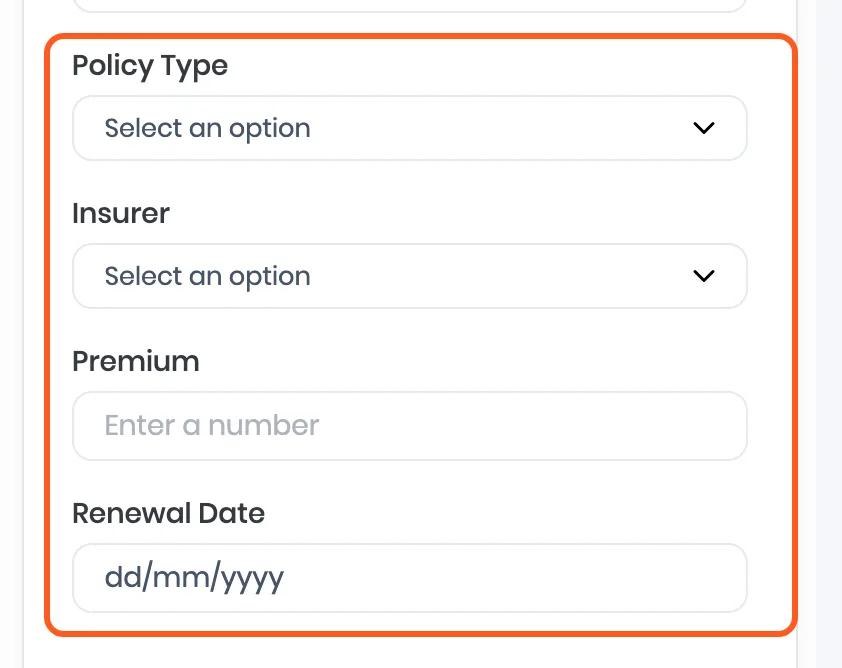
Add the fields your policies need
In Forms Desk, add Policy Type, Insurer, Premium and Renewal Date. Your team fills them when a policy is sold, or when an enquiry tells you when their current policy ends.
- 2
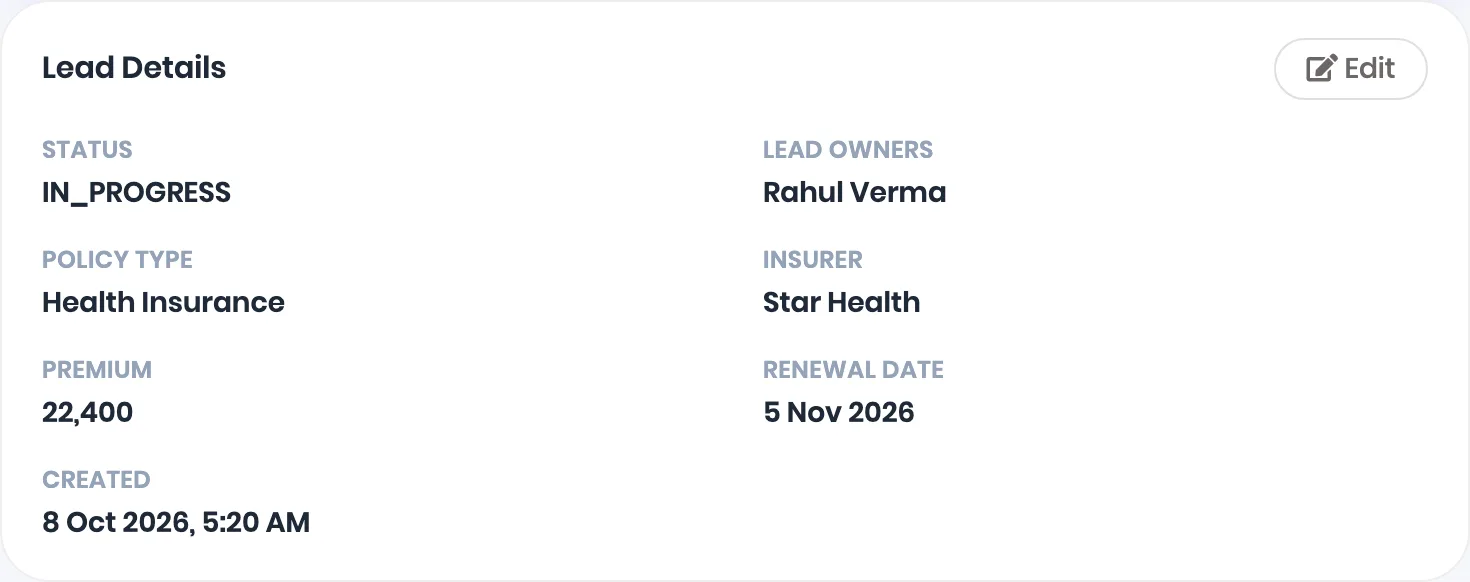
Every customer carries their policy
Open a customer and the policy sits next to the owner: Health Insurance, Star Health, a premium of 22,400 and the renewal date. Calls, notes, follow-ups and WhatsApp messages are on the same page.
- 3
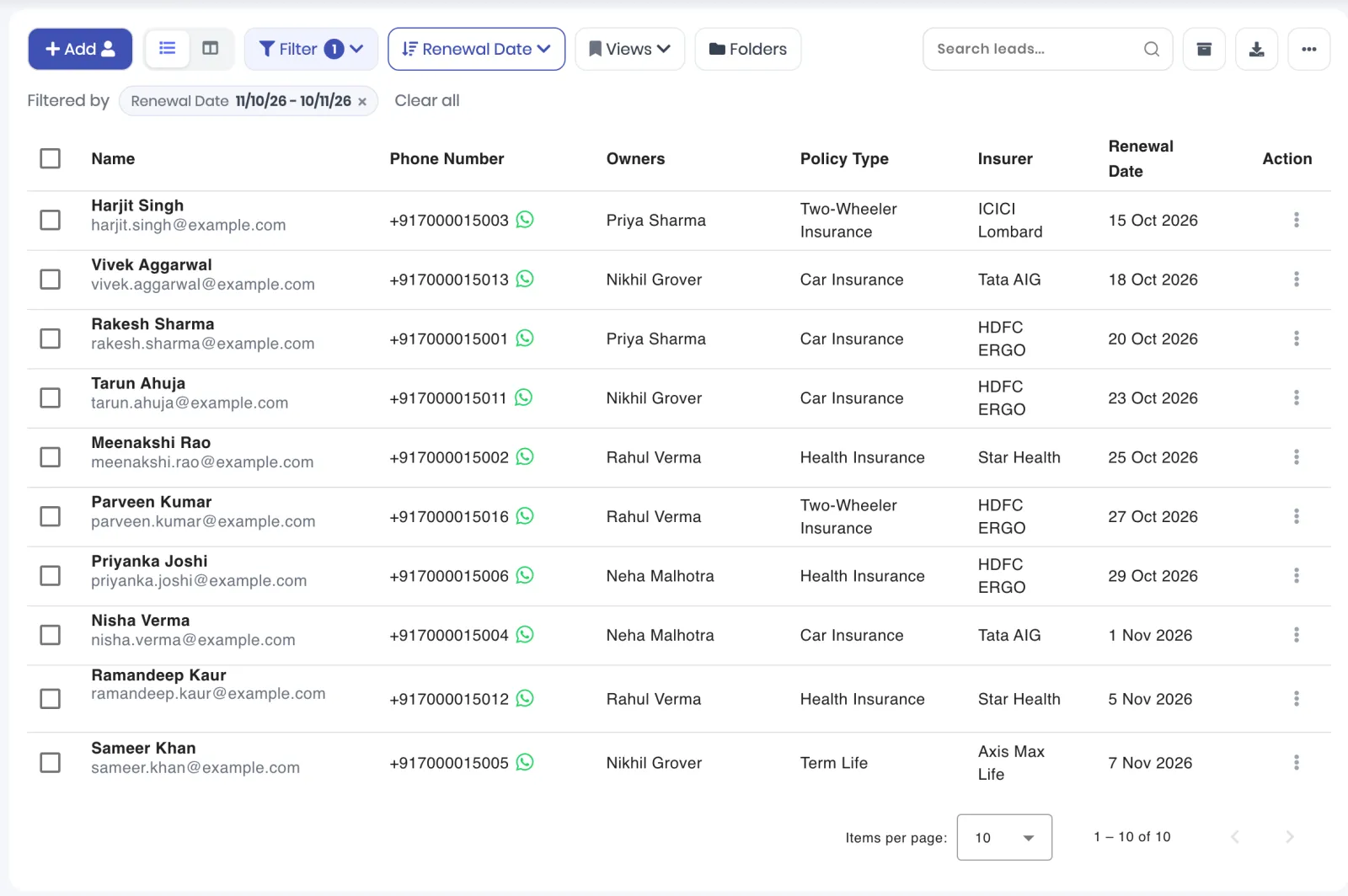
Pull every renewal due this month
Filter the lead list by Renewal Date, from today to a month out, and sort it by the same field so the nearest renewal is on top. Show Policy Type, Insurer and Renewal Date as columns, and each owner knows whom to call first.
- 4
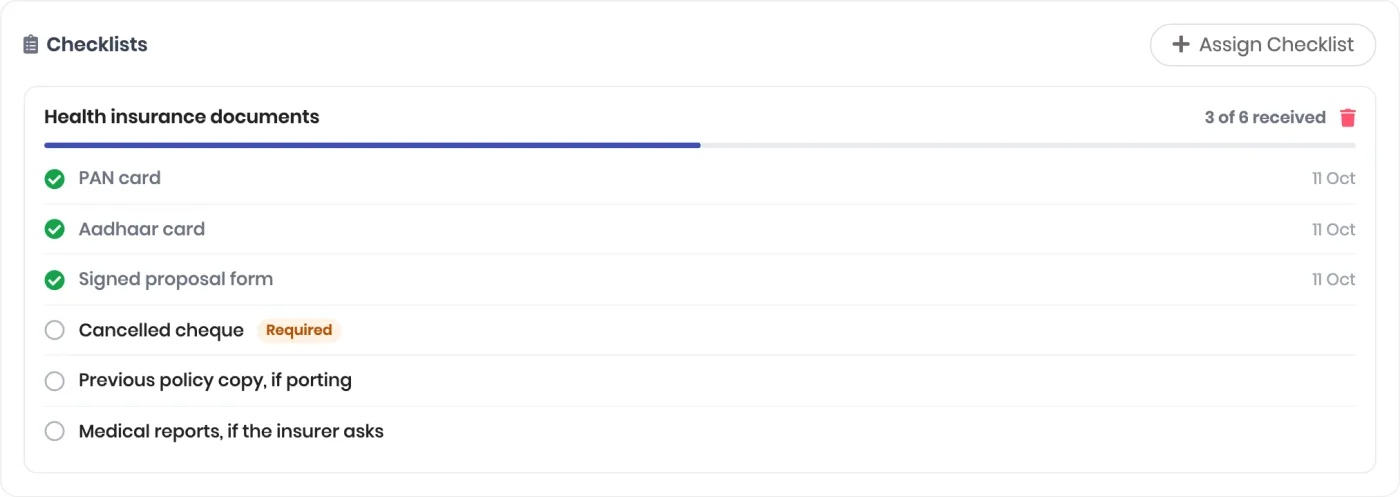
Track KYC against a checklist
Assign a checklist and see at a glance what is in and what is not. Required items stay flagged until they arrive. Share the client portal link and the customer uploads the rest themselves.
A starting document checklist by policy type
| Policy type | Documents most insurers ask for | Often asked later |
|---|---|---|
| Car insurance | PAN or Aadhaar for KYC, RC copy, previous policy copy for a renewal or a switch | Vehicle inspection photos if the old policy has lapsed |
| Two-wheeler insurance | PAN or Aadhaar for KYC, RC copy, previous policy copy | Inspection if the old policy has lapsed |
| Health insurance | PAN and Aadhaar for KYC, signed proposal form, photograph | Medical tests by age and cover, previous policy copy when porting |
| Term life | PAN and Aadhaar for KYC, signed proposal form, income proof such as ITR or salary slips | Medical tests, a video or tele-medical call |
Every insurer sets its own list, so treat this as the starting checklist and edit it per insurer. ViveLead does not connect to insurer portals, so policy numbers and status are entered by your team. To run branch offices on one account, see Run several branches from one ViveLead account.
Get Started in 3 Steps
No technical team needed. After a short demo we open your account, and these are the first three steps.
Bring In Your Customers
Import your policy sheet with your own column names, and connect your website form and Facebook lead ads so new enquiries arrive on their own.
Set Up Fields and Checklists
Add policy type, insurer, premium and renewal date in Forms Desk, and create a document checklist for each policy type you sell.
Add Your Telecallers
Add each telecaller with a role, install the app on their phone, and link the call recording folder on Professional.
Trusted by Growing Sales Teams
Frequently Asked Questions
Common questions about ViveLead for insurance agents
Not on its own. ViveLead does not watch the Renewal Date field and send a reminder as the date comes close. Two things cover it today: filter the lead list by Renewal Date to see every policy renewing in a window, and add a follow-up dated a few weeks before each renewal. On Professional, the rep gets a reminder before the follow-up is due and a notice when it is overdue.
Yes. Add Policy Type and Insurer as dropdowns with your own options, plus Premium and Renewal Date, in Forms Desk. Every customer carries them, and the lead list filters by each one. A customer with two policies can carry the second in its own fields, or as a deal.
Assign a document checklist to the customer and share the client portal link from their lead. The customer signs in with a one-time code and uploads each document against the checklist, and the file lands on the lead with the item ticked. Your team can also tick items by hand when a document arrives another way.
Calls made from the ViveLead app on the rep's own phone are logged on the lead with duration and outcome on every plan. The recordings upload too on the Professional plan, from Android phones, once the rep links their phone's recording folder.
On the Business plan, yes. AI calls pay for the phone line at Rs 4.75 a minute plus the model's usage, from a prepaid AI wallet. See [what AI calling does](/blog/ai-dialer/) before deciding if it fits your enquiries.
Most agencies need Professional, for WhatsApp, call recordings, follow-up reminders and automation: Rs 799 per user per month billed yearly, or Rs 999 billed quarterly. Starter (Rs 399 billed yearly) covers lead management, the renewal filter and call logging, without recordings, reminders or WhatsApp. Agencies with branch offices need Business at Rs 1,359 billed yearly.
No. ViveLead does not read policies or quotes from insurer portals, and it does not track the payout insurers pay the agency. Its commission module pays commission to your own team on won deals.
See who renews this month. Book a demo.
Start your 7-day free trial. No credit card required. Setup in 5 minutes.